
Windows 11 Unlocks Shared Audio: A Long-Awaited Feature for Collaborative Listening
Microsoft has finally begun the widespread rollout of a feature that has been on the radar for some time, bringing a long-requested audio sharing capability to Windows 11. Dubbed "Shared Audio," this new functionality, integrated into the latest update (KB5089573), allows users to broadcast audio from their PC to two separate Bluetooth devices simultaneously. This mirrors a feature that has been a staple on smartphones for years and promises to enhance collaborative experiences for Windows users.
The Journey to Shared Audio: A Phased Rollout
The introduction of Shared Audio to Windows 11 is not an overnight sensation. Microsoft first offered a preview of this capability in late 2025, targeting Windows Insiders. This phased approach allowed for testing and refinement before a broader public release. The latest update, KB5089573, marks the culmination of this process, aiming to bring the feature to all eligible Windows 11 users.
This gradual rollout strategy, while sometimes frustrating for eager users, is a common practice for Microsoft. It allows for the identification and resolution of potential bugs and compatibility issues across a diverse range of hardware and software configurations. The company’s history of releasing updates incrementally means that while the feature is now officially available, some users might experience a slight delay before it appears on their systems.
Unpacking the Technical Requirements: What You Need for Shared Audio
For Shared Audio to function seamlessly, several key components must align. The primary requirements revolve around the Windows 11 version, Bluetooth capabilities of the PC, and the Bluetooth audio devices themselves.
Essential Hardware and Software Prerequisites:
- Windows 11 Version: Your PC must be running Windows 11 build 26200.8524 or a later version. This specific build number signifies the integration of the necessary underlying system architecture for Shared Audio.
- Bluetooth LE Audio Broadcast Support: The computer’s Bluetooth adapter must support Bluetooth Low Energy (LE) audio broadcast. This is a newer standard that enables efficient and high-quality audio transmission, crucial for features like Shared Audio.
- Bluetooth LE Audio Compatibility for Devices: Both of the Bluetooth audio devices (headphones, earbuds, speakers) you intend to connect must also support Bluetooth LE Audio. This is a critical point, as older Bluetooth devices will not be compatible with this feature.
- "Use LE Audio when available" Enabled: Within Windows’ Bluetooth settings, the "Use LE Audio when available" option must be enabled for each connected Bluetooth audio device. This ensures that the system prioritizes the LE Audio connection when available, facilitating the Shared Audio functionality.
The author notes a personal experience where, despite having an updated Windows 11 and two compatible LE Audio devices, the Shared Audio feature had not yet appeared on their system. This underscores the gradual nature of Microsoft’s update rollouts and suggests that users may need to be patient as the feature propagates across all eligible devices.
How to Access and Enable Shared Audio
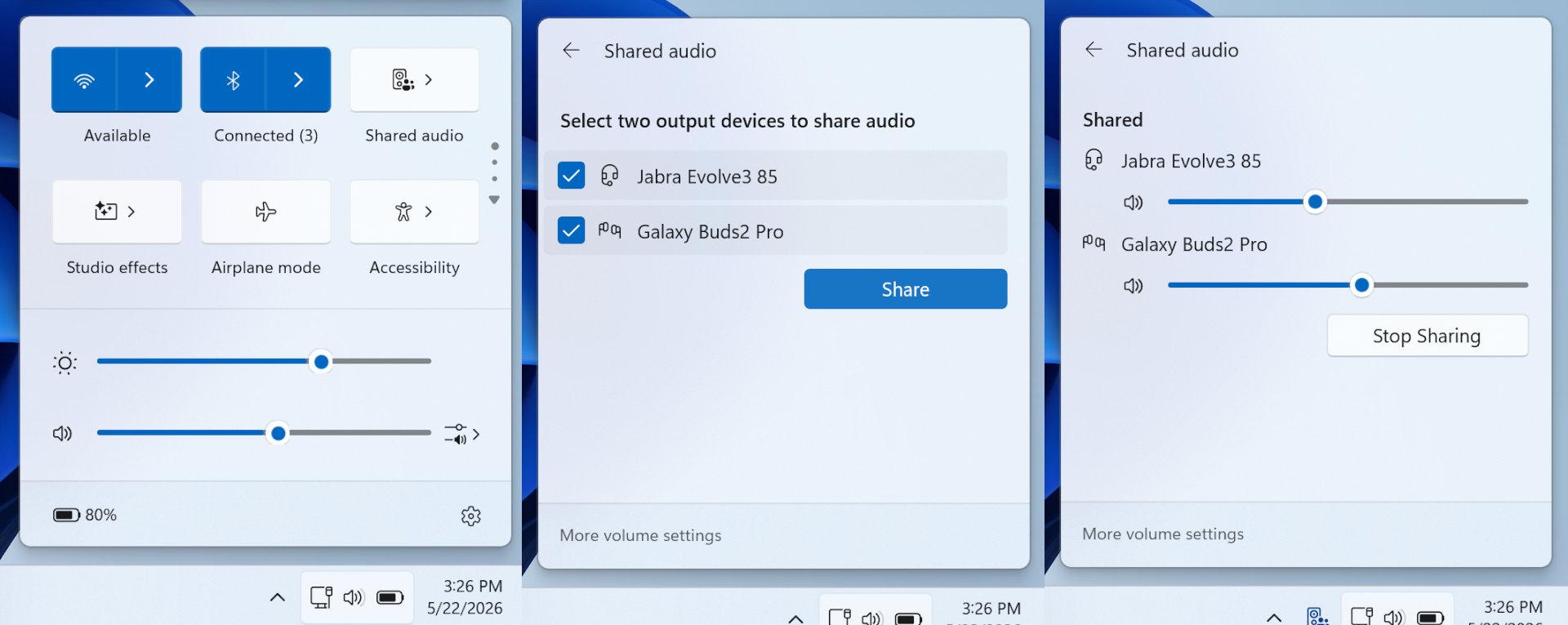
Once all the technical prerequisites are met, enabling Shared Audio is designed to be a straightforward process. The feature is integrated into Windows 11’s Quick Settings menu, a convenient overlay accessible from the system tray.
Steps to Enable Shared Audio:
- Connect Two Bluetooth Audio Devices: Ensure that both of your compatible Bluetooth audio devices are connected to your Windows 11 PC.
- Access Quick Settings: Click on the network, volume, or battery icons located to the left of the clock in the system tray. This will open the Quick Settings panel.
- Locate the Shared Audio Option: If your system meets all the requirements and the feature is active, you should see an option for "Shared Audio" within the Quick Settings dropdown menu.
- Enable Shared Audio: Click on the Shared Audio option to activate it. This will initiate the broadcast of audio to both connected devices.
Microsoft has provided visual guides, as seen in the accompanying imagery, to illustrate the location of this setting within the Windows 11 interface. These screenshots highlight the Quick Settings panel and the specific toggle for Shared Audio, making it easier for users to identify and activate the feature.
The Significance of Shared Audio: Beyond a Niche Feature
While the author expresses that this may not be a feature they personally utilize frequently, acknowledging that smartphones have offered similar functionality for a considerable time, the introduction of Shared Audio to Windows 11 holds broader implications.

Enhancing Collaborative Experiences:
- Shared Entertainment: The most immediate benefit is for users who wish to share audio content from their PC with another person. This is particularly useful for watching movies, listening to music, or playing games together on a single laptop. Instead of relying on the often-inferior built-in speakers or awkwardly sharing a single pair of earbuds, two individuals can now enjoy synchronized audio through their own headphones.
- Improved Productivity: In professional settings, Shared Audio could facilitate collaborative tasks. For instance, a presenter could share audio from a video or presentation with a colleague for review without needing to disconnect and reconnect devices or resort to less ideal audio solutions.
- Accessibility: For users with specific audio needs or preferences, Shared Audio could offer greater flexibility. It allows for the simultaneous use of different types of headphones or earbuds, catering to individual comfort or hearing requirements.
The "AirPods-Style" Analogy:
The comparison to Apple’s AirPods-style audio sharing is apt. This feature, often referred to as "Audio Sharing" or "Share Audio" on Apple devices, has been a popular and well-integrated aspect of their ecosystem. Microsoft’s implementation aims to bring a comparable level of convenience and functionality to the Windows platform, bridging a gap that has long existed for PC users.
Technical Underpinnings: Bluetooth LE Audio
The technological foundation for Shared Audio is Bluetooth Low Energy (LE) Audio. This newer standard represents a significant evolution from classic Bluetooth audio. Key advantages of Bluetooth LE Audio include:
- Lower Power Consumption: As the name suggests, LE Audio is designed to be more power-efficient, leading to longer battery life for both the transmitting device (the PC) and the receiving audio devices.
- Improved Audio Quality: LE Audio supports advanced audio codecs, such as LC3 (Low Complexity Communication Codec), which can deliver higher-fidelity audio at lower bitrates compared to older codecs like SBC. This translates to a better listening experience.
- Multi-Stream Audio: This is the core technology enabling Shared Audio. LE Audio allows for multiple independent audio streams to be transmitted from a single source to multiple sinks. This means that the PC can send separate audio streams to two different headphones simultaneously, each controlled independently.
- Broadcast Audio: LE Audio also introduces the concept of broadcast audio, where a single audio source can transmit to an unlimited number of LE Audio receivers within range. While Shared Audio focuses on a one-to-two scenario, this broadcast capability opens doors for future enhancements and group listening experiences.
The widespread adoption of Bluetooth LE Audio is crucial for the success of features like Shared Audio. As more manufacturers integrate LE Audio support into their devices, the compatibility and usability of this feature will continue to expand.
A Long Time Coming: The Windows Update Cycle
The author’s observation that "we’ve had to wait far too long for it" resonates with many Windows users who have experienced similar delays in the implementation of desired features. Microsoft’s development and release cycles can be complex, involving extensive internal testing, Insider previews, and phased rollouts.
- Insider Program: The initial preview phase for Shared Audio through the Windows Insider program is a vital step. It allows a dedicated group of users to provide feedback and identify bugs before the feature is released to the general public. This can help mitigate widespread issues upon broader release.
- Phased Rollouts: Microsoft often employs phased rollouts for major updates. This means that the update containing the new feature is not pushed to all eligible devices simultaneously. Instead, it’s gradually released to a percentage of users, with Microsoft closely monitoring for any critical issues. This approach helps to minimize the impact of any unforeseen problems.
- Hardware Compatibility: As highlighted earlier, the successful implementation of Shared Audio is heavily dependent on hardware compatibility. The requirement for Bluetooth LE Audio support on both the PC and the audio devices means that users with older hardware may not be able to take advantage of this new feature without upgrading their components.
While the wait for Shared Audio may have felt lengthy, its eventual integration signifies Microsoft’s commitment to enhancing the user experience and bringing Windows 11 in line with modern audio sharing capabilities.
Implications for the Future of PC Audio
The introduction of Shared Audio is more than just a single feature; it represents a step towards a more connected and versatile audio experience on Windows PCs.
- Ecosystem Integration: This feature further integrates Windows into the broader landscape of modern audio sharing, aligning it with the seamless experiences offered by other platforms.
- Potential for Further Development: The underlying LE Audio technology has the potential for even more advanced audio features in the future. We might see developments in multi-room audio, enhanced spatial audio experiences, or even more sophisticated ways to manage and share audio streams across multiple devices.
- Democratizing Audio Sharing: By making this feature available on Windows, Microsoft is democratizing audio sharing for a vast user base. It moves beyond niche solutions and makes a convenient and enjoyable listening experience accessible to a wider audience.
In conclusion, Microsoft’s rollout of Shared Audio in Windows 11, while a long time in the making, is a welcome addition. It addresses a genuine user need for collaborative listening and leverages the advancements of Bluetooth LE Audio to deliver a more integrated and enjoyable experience. As the feature continues its widespread deployment, users can look forward to sharing their audio content with friends and colleagues more seamlessly than ever before on their Windows PCs.




Leave a Comment