The Resolution Revolution: Navigating the Technical Divide Between Print and Web Distribution
Main Facts: The Digital Dilemma of the Modern Illustrator
In the evolving landscape of digital media, the transition from traditional print-based workflows to web-optimized distribution remains one of the most significant technical hurdles for independent creators. Recently, a query posed to industry expert Brad Guigar on Webcomics.com highlighted a recurring struggle among veteran illustrators: the counterintuitive relationship between resolution (DPI), physical dimensions, and pixel density when moving files from software like Clip Studio Paint to Adobe Photoshop for web publication.
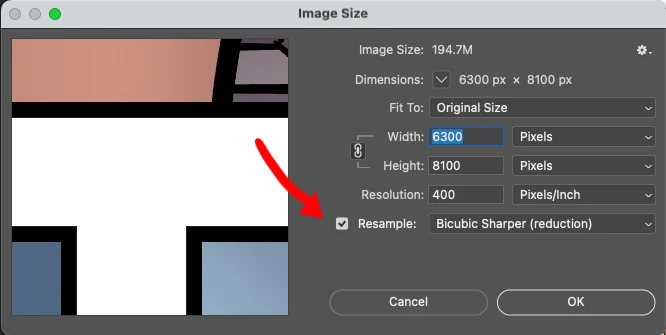
The core of the issue lies in a fundamental misunderstanding of "resampling." A creator, working with a high-resolution comic strip measuring 16.25 x 6 inches at 600 dots per inch (DPI), attempted to downsample the file to 144 DPI for web use. By unchecking the "resample" box in Photoshop’s Image Size dialog, the user inadvertently instructed the software to keep every single pixel intact while merely changing the metadata for print output. The result was a gargantuan virtual document measuring 67.708 x 25 inches—a file size that is functionally "obnoxious" for web browsers and mobile devices.
This technical friction underscores a broader industry shift. As the "print-first" era cedes ground to "digital-first" or "hybrid" models, the mastery of raster mathematics has become as essential to the cartoonist’s toolkit as the brush or the pen.
Chronology: From Lead Type to Liquid Retina Displays
To understand why modern file preparation is so confusing, one must look at the chronological evolution of imaging standards over the last four decades.
The Print Era (1980s – Late 1990s)
During the heyday of syndicated newspaper strips and comic books, the workflow was linear. Artists worked on large Bristol boards, which were then scanned at high resolutions—typically 300 to 600 DPI—to ensure that the "dots" of ink from the printing press would be dense enough to create smooth lines and gradients. In this era, "inches" were the only metric that mattered because the final product was a physical object.
The Early Web Era (2000 – 2010)
With the birth of webcomics, a new standard emerged: 72 Pixels Per Inch (PPI). This was based on the standard resolution of cathode-ray tube (CRT) monitors of the time. Creators were taught to "Save for Web," a process that stripped away print metadata and shrunk images to fit 800×600 or 1024×768 screen resolutions. The divide between "High-Res" (Print) and "Low-Res" (Web) was a binary wall.
The High-Density Era (2010 – Present)
The introduction of Apple’s "Retina" displays and high-PPI mobile screens shattered the 72 PPI standard. Suddenly, a 72 PPI image looked blurry on a modern smartphone. This led to the adoption of 144 PPI or even 300 PPI for web delivery to ensure "crispness." It is in this current era that the user in the Webcomics.com query finds themselves—trying to bridge the gap between 600 DPI archival quality and 144 DPI web-ready clarity, but getting lost in the legacy settings of professional software.
Supporting Data: The Mathematics of the Pixel
The confusion regarding the "obnoxiously huge" file size reported by the creator can be explained through simple arithmetic. Understanding these numbers is vital for any professional journalist or creator operating in the digital space.
The Calculation Breakdown
When the creator started with a 16.25-inch wide image at 600 DPI, the total horizontal pixel count was:
- 16.25 inches × 600 pixels per inch = 9,750 pixels.
In digital terms, the "physical size" in inches is merely a suggestion for a printer. The only thing the computer truly cares about is that the image is 9,750 pixels wide.
When the user went into Photoshop and changed the resolution to 144 DPI while unchecking "Resample," they told Photoshop: "Do not throw away any of my 9,750 pixels. Instead, just tell the printer to spread them out thinner."
The resulting math became:
- 9,750 pixels / 144 pixels per inch = 67.708 inches.
This explains why the document’s dimensions ballooned. To the computer, the file didn’t actually get "bigger" in terms of data; it just changed its internal label for how large it should be printed. For the web, where "inches" do not exist and only pixels matter, a 9,750-pixel wide image is massive, often exceeding 10MB to 20MB in size, which would lead to catastrophic load times on a standard website.
Comparative Standards for Web Delivery
- Standard Desktop Width: 1,200 to 1,920 pixels.
- Mobile-Optimized Width: 600 to 800 pixels.
- The User’s File: 9,750 pixels (roughly 8 times larger than the average desktop screen).
Official Responses: Expert Guidance on File Optimization
Brad Guigar, a veteran of the webcomics industry and a consultant for thousands of creators, emphasizes that the "Resample" checkbox is the most critical toggle in the Adobe Photoshop "Image Size" menu.
The Recommended Workflow
According to industry standards provided by experts at Webcomics.com and corroborated by Adobe’s technical documentation, the correct procedure for transitioning from Clip Studio Paint (CSP) to the web involves "Downsampling."
- Preserve the Original: Always keep the 600 DPI CSP file as a "Master File." This is the archival version for future print collections or high-quality merchandise.
- The Photoshop Export: When importing into Photoshop, the user must ensure "Resample" is checked.
- Interpolation Algorithms: When resampling, Photoshop offers various algorithms. For illustrators, "Bicubic Sharper (reduction)" is often recommended to maintain the crispness of line art when shrinking the pixel count.
- Targeting Pixels, Not Inches: Experts suggest ignoring the "Inches" field entirely when preparing for the web. A creator should instead set the width to a specific pixel count (e.g., 1,000 pixels wide) and let the DPI fall where it may, as browsers ignore DPI metadata entirely.
The Software Perspective
Celsys, the developer of Clip Studio Paint, has recently integrated more robust "Export" features that allow creators to bypass Photoshop entirely. Their official documentation suggests using the "Export (Single Layer)" function, which allows users to specify an output width in pixels or a percentage of the original, effectively handling the resampling math automatically and preventing the "67-inch wide" error.
Implications: The High Cost of Technical Errors
The stakes for proper file preparation extend far beyond the artist’s personal frustration. There are significant economic and structural implications for creators who fail to optimize their digital assets.
1. Search Engine Optimization (SEO) and User Retention
Google’s "Core Web Vitals" update has made page load speed a primary ranking factor. An "obnoxiously huge" image—like the 9,750-pixel file discussed—can take several seconds to load on a 4G mobile connection. Studies show that 53% of mobile users abandon a site if it takes longer than three seconds to load. For a webcomic creator, this technical error results in a direct loss of audience and ad revenue.
2. Bandwidth and Hosting Costs
For creators hosting their own websites, serving unoptimized files can lead to massive "bandwidth overage" charges from hosting providers. If a 10MB image is viewed by 10,000 people, it consumes 100GB of bandwidth. If that same image were properly downsampled to 200KB, it would consume only 2GB for the same number of views.
3. The "6-Bit Video Game" Aesthetic (Pixelation)
The user expressed fear of making the image look like a "6-bit video game." This occurs when an image is downsampled too aggressively or saved with high compression. By understanding the balance between pixel dimensions and file format (such as using PNG-24 for crisp lines or WebP for efficient compression), creators can maintain a "retina-ready" look without the baggage of a high-resolution print file.
4. Accessibility and Global Reach
In many parts of the world, high-speed internet is a luxury. Professional-grade file preparation ensures that art is accessible to users in emerging markets where data is expensive and connection speeds are limited. Optimization is, in many ways, an act of inclusivity.
Conclusion: The Path Forward
The query posed to Webcomics.com serves as a vital reminder that in the digital age, the "art" of cartooning is inseparable from the "science" of digital imaging. The transition from 600 DPI print masters to 144 PPI web assets requires more than just changing a number; it requires a conceptual shift from physical measurements to pixel-based logic.
By mastering the "Resample" function and prioritizing pixel width over physical inches, creators can ensure their work remains sharp, fast-loading, and future-proof. As the industry moves toward even higher-resolution displays and more complex web environments, the ability to navigate these technical waters will remain a defining characteristic of the successful modern professional.