
Microsoft Bows to User Feedback: Windows 11 to Restore Taskbar Flexibility and Start Menu Customization

In a significant pivot that marks a departure from its previously rigid design philosophy, Microsoft has announced a suite of highly anticipated updates for Windows 11. These changes, currently rolling out to testers, address some of the most persistent criticisms leveled against the operating system since its 2021 debut: the inability to move the taskbar and the lack of granular control over the Start menu.
For years, the Windows power-user community has expressed frustration over the "simplified" interface of Windows 11, which many felt stripped away essential productivity features present in Windows 10. By reintroducing the ability to reposition the taskbar and offering a more modular Start menu, Microsoft appears to be entering a new era of "listening," prioritizing user agency over a strictly curated aesthetic.
Main Facts: A Return to Personalization
The core of the announcement centers on two pillars of the Windows interface: the Taskbar and the Start menu. According to official documentation from Microsoft’s Windows Insider blog, these features are being developed to make the desktop experience "more personal" and "productive."
The Taskbar Renaissance
The most striking update is the restoration of taskbar mobility. Since the launch of Windows 11, the taskbar has been anchored to the bottom of the screen, a decision Microsoft previously defended by citing the complexities of rebuilding the taskbar from the ground up using modern code. The new update allows users to move the taskbar to the top, left, or right sides of the desktop.
Additionally, Microsoft is introducing:

- Icon Alignment Flexibility: Users can now choose to center their icons or align them to the left, regardless of which side of the screen the taskbar occupies.
- Manual Sizing: A "small taskbar" mode is being introduced, allowing users to shrink the taskbar and its buttons to maximize screen real estate—a feature particularly beneficial for those working on smaller laptop displays or ultra-wide monitors.
The Start Menu Overhaul
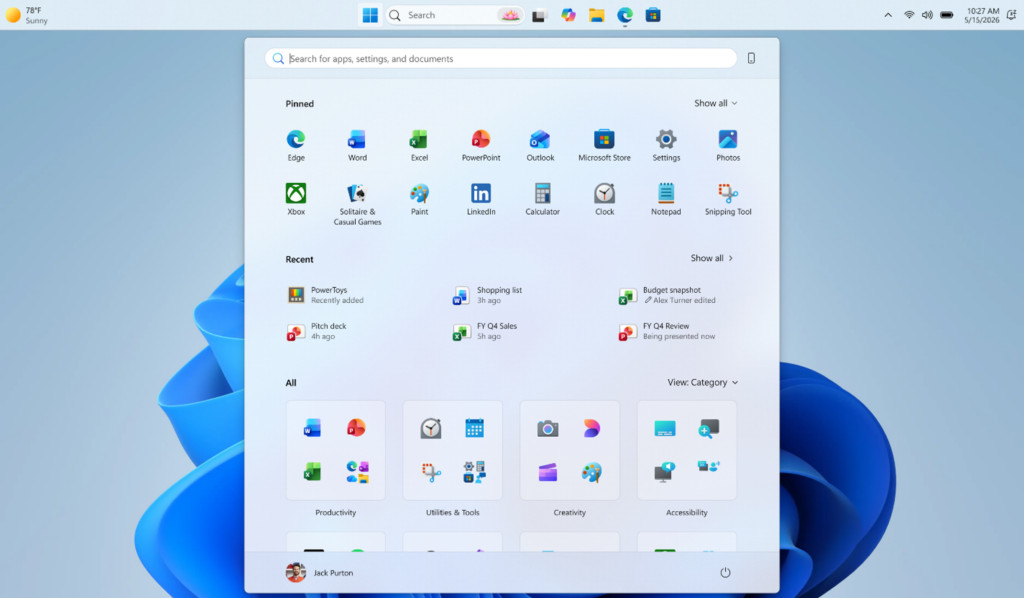
The Start menu, often a polarizing element of Windows 11, is receiving a "modular" update. Users have long complained that the "Recommended" section—which displays recently opened files and suggested apps—occupied too much space. The upcoming changes will include:
- Resizability: Users can toggle between "Small" and "Large" views for the Start menu.
- Section Toggles: Clear, independent switches will allow users to hide the "Pinned," "Recommended," or "All Apps" sections entirely.
- Decoupled Functionality: Crucially, turning off the "Recommended" panel in the Start menu will no longer disable jump lists or recent files in File Explorer, a limitation that previously forced users to choose between a clean Start menu and a functional file management system.
Chronology: The Road from Rigidity to Flexibility
To understand the weight of these changes, one must look at the three-year journey of Windows 11.
- October 2021 (The Launch): Windows 11 arrives with a centered taskbar and a simplified Start menu. Microsoft confirms that moving the taskbar to the top or sides is no longer supported, leading to an immediate backlash from developers, coders, and multi-monitor users.
- 2022–2023 (The Resistance): Feedback on the Windows Feedback Hub regarding taskbar movement becomes one of the most upvoted requests in the history of the platform. Microsoft executives initially suggest that the feature is not a priority, citing low usage data from Windows 10.
- Early 2024 (The Pivot): Reports emerge that Microsoft is restructuring its Windows team. Internal memos suggest a renewed focus on "Windows Quality" and user satisfaction to prevent user migration to macOS or Linux.
- May 2024 (The Announcement): Microsoft officially confirms in a blog post that taskbar movement and Start menu resizing are entering the "Experimental" channel for Windows Insiders.
- Present Day: Taskbar changes are live for Experimental testers, with Start menu enhancements scheduled to roll out in the "coming weeks."
Supporting Data: Why Customization Matters
The demand for these features is not merely aesthetic; it is rooted in productivity and ergonomics.
The Ultra-Wide Monitor Factor
With the rise of 21:9 and 32:9 ultra-wide monitors, a bottom-centered taskbar is often inefficient. Users with extreme horizontal space frequently prefer a vertical taskbar (on the left or right) to keep system tray icons and app shortcuts within their peripheral vision without having to look down across a massive vertical span.
The "Start Screen" Fatigue
Data suggests that the Windows 8 "Start Screen" era left a lasting scar on the user base. When the Windows 11 Start menu expanded to cover a large portion of the screen with "Recommended" content, many users felt it was a regression toward that full-screen, intrusive design. By allowing a "Small" Start menu setting, Microsoft is effectively offering a "launcher-only" mode, which third-party telemetry shows is the preferred method for power users who rely on keyboard shortcuts and pinned apps.

Third-Party Dominance
The vacuum left by Microsoft’s rigid design led to a surge in third-party software. Programs like Start11 and ExplorerPatcher became essential downloads for millions of users specifically to restore the features Microsoft is only now reintroducing. The fact that these programs maintained high sales and download numbers served as a clear data point for Microsoft that the demand for customization was not a "vocal minority" issue but a market reality.
Official Responses and Development Philosophy
In the blog post titled "Improving Windows Quality: Making Taskbar and Start more personal," Microsoft’s engineering team emphasized a shift in how they view the desktop interface.
"We’ve heard the feedback loud and clear," the post noted. "Windows is a tool for billions of people, each with unique workflows. Our goal is to ensure the interface adapts to the user, rather than forcing the user to adapt to the interface."
This shift in tone is significant. In the early days of Windows 11, the messaging was focused on "simplicity" and "calm." The current messaging focuses on "utility" and "choice." This suggests that the Windows Insider program is being utilized more effectively as a diagnostic tool for user sentiment, rather than just a bug-hunting platform.
However, Microsoft has been careful to label these features as "Experimental." This gives the company a "safety valve" to refine the code before a general release. The taskbar, in particular, requires significant testing to ensure that UI elements like the Notification Center, Copilot, and Task View align correctly when the bar is positioned vertically.
Implications: A Glimpse into the Future of Windows
The decision to restore these features carries heavy implications for the future of the Windows ecosystem, particularly as rumors of "Windows 12" begin to circulate.
1. The End of "Design Dictatorship"
For several years, Microsoft followed a "mobile-first" design philosophy that prioritized touch-friendly, simplified interfaces. The reversal of these decisions suggests that Microsoft has re-realized that Windows is, first and foremost, a desktop productivity environment. This move could signal that future versions of Windows will launch with high levels of customization built-in, rather than adding them years later as "fixes."
2. The Battle for Local Accounts and Privacy
While the interface updates are a win for users, they highlight the areas where Microsoft remains stubborn. The analysis of this update suggests that the next "frontier" for user feedback will be the requirement for a Microsoft Account (MSA) during setup. Currently, Windows 11 makes it increasingly difficult to install the OS with a local account. If Microsoft truly intends to "listen" to its users, the option for a local-only setup—and a reduction in "promotional" content (ads) within the Start menu—must be addressed.
3. Productivity over "Upselling"
There is a growing concern that Windows is becoming a "billboard" for Microsoft services like OneDrive, Edge, and Bing. The decoupling of the "Recommended" section from File Explorer is a positive step, as it suggests Microsoft is willing to sacrifice "engagement" metrics for the sake of a cleaner user experience. If this trend continues, we may see a "Pro" mode for Windows that allows users to disable all promotional "nudges" with a single toggle.
4. Technical Debt and Modernization
The delay in bringing back these features was largely due to "technical debt." Because the Windows 11 taskbar was a total rewrite, old features couldn’t just be "turned on"—they had to be coded from scratch. The successful implementation of these features in the Experimental channel proves that Microsoft has finally overcome the foundational hurdles of its new UI framework (WinUI 3). This paves the way for even more complex UI changes in the future, such as a truly modular desktop where widgets and taskbar elements can be floated or docked anywhere.
Conclusion
The upcoming updates to the Windows 11 Taskbar and Start menu represent a pivotal moment in the operating system’s lifecycle. By restoring the ability to move the taskbar and providing a more compact, controllable Start menu, Microsoft is doing more than just fixing a few UI gripes; it is rebuilding trust with its most loyal user base.
While critics will rightly argue that these features should never have been removed in the first place, the fact that Microsoft is now acting on feedback with such specificity is a hopeful sign. For the millions of coders, designers, and office workers who found Windows 11’s initial rigidity a barrier to their workflow, the "Experimental" channel today offers a glimpse of a more flexible, user-centric tomorrow. The challenge now remains for Microsoft to apply this same "listening" logic to deeper issues like privacy, advertising, and account requirements. If they do, Windows 11 might finally become the successor to Windows 10 that users actually wanted.



Leave a Comment