Blender 5.3 Ushers in a New Era of 3D Realism with Native Gaussian Splat Support
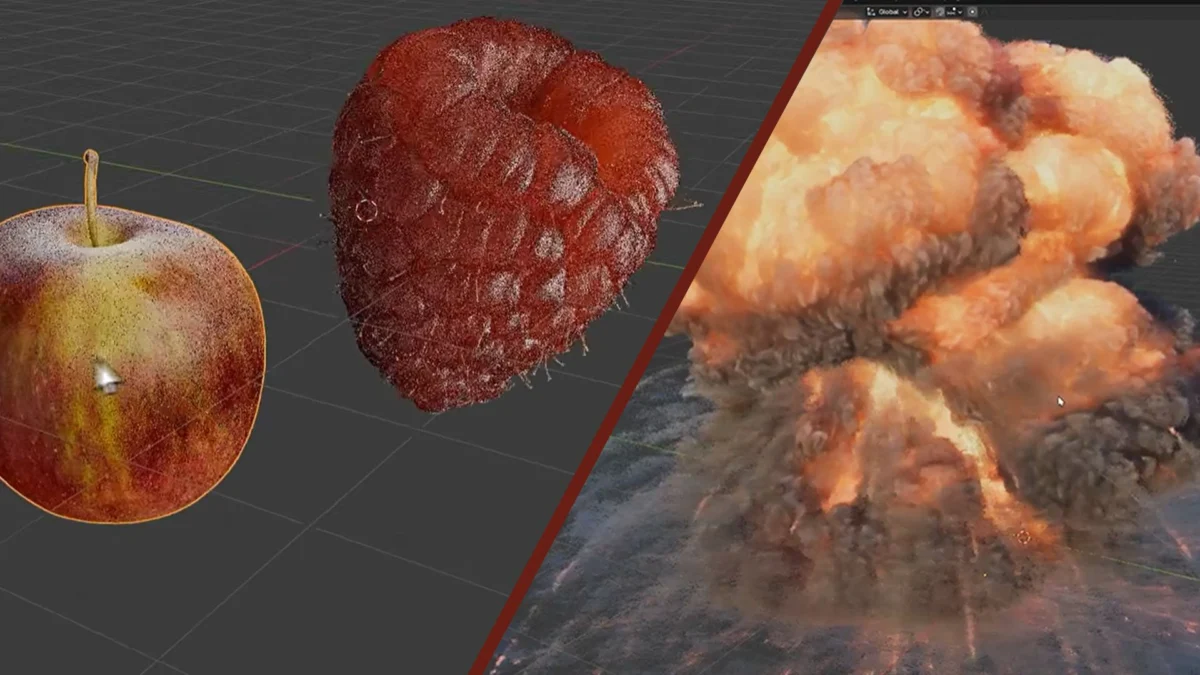
The highly anticipated Blender 5.3, currently in its alpha stage and slated for a full release in November, is poised to revolutionize 3D content creation with the groundbreaking integration of native Gaussian Splatting support. This development solidifies Blender’s position as the preeminent free tool for both 2D and 3D animation and modeling, offering artists unprecedented capabilities in recreating photorealistic environments and objects directly within the software.
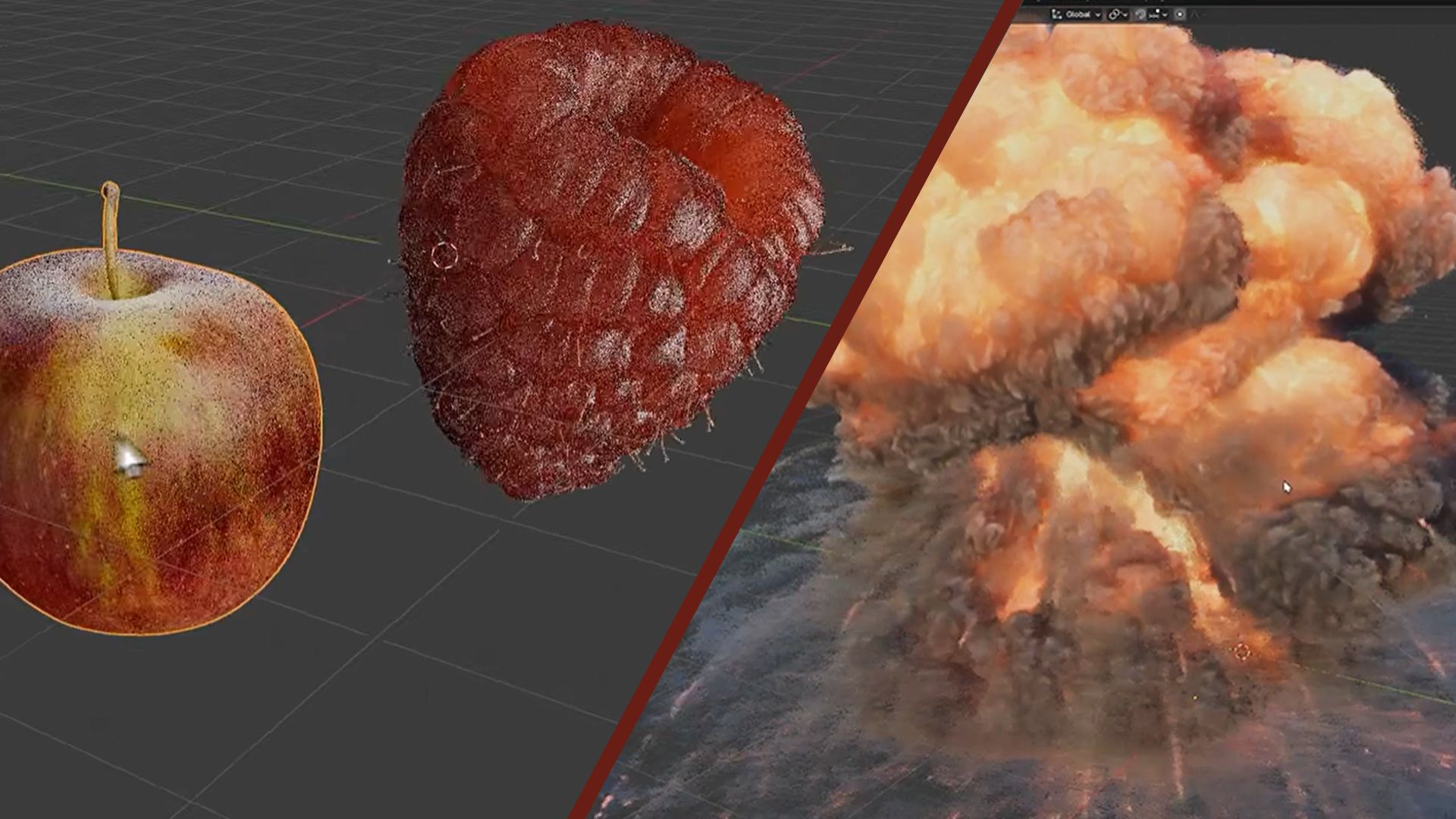
Gaussian Splatting, a relatively nascent yet incredibly powerful technique, has been rapidly gaining traction in the 3D community for its ability to generate stunningly lifelike 3D scenes from simple photographic inputs. Unlike conventional polygonal modeling, which relies on geometric shapes, Gaussian splatting utilizes millions of tiny, overlapping colored "blobs" to represent scenes. Each splat encapsulates crucial data, including its position, size, shape, color, and transparency, allowing for incredibly detailed and nuanced representations of reality.
The inclusion of native Gaussian Splat support in Blender 5.3 marks a significant leap forward, democratizing access to this advanced technology. Previously, artists had to rely on external software and complex workarounds, such as utilizing tools like Brush or COLMAP and then importing the resulting PLY files via specialized add-ons. Blender 5.3 eliminates these barriers, enabling users to directly import 3D Gaussian Splats from PLY and SPZ files. While export functionality is not yet available in this iteration, the ability to render these splats using Blender’s robust rendering engines – Workbench, EEVEE, and Cycles – opens up a vast landscape of creative possibilities.
The Dawn of Accessible Gaussian Splatting in Blender
The integration of Gaussian Splatting into Blender’s core functionality is not merely an incremental update; it represents a paradigm shift in how 3D assets can be created and utilized. This new feature empowers artists to bridge the gap between the real world and the digital realm with remarkable fidelity.
What are Gaussian Splats?
At its heart, Gaussian Splatting is a novel approach to representing 3D scenes. Instead of constructing a scene from traditional polygons, which can be computationally intensive and time-consuming to detail, Gaussian splatting leverages a collection of millions of small, translucent, and often overlapping spherical or ellipsoidal primitives, known as "gaussians" or "splats." Each splat possesses a set of properties that define its appearance and position in 3D space:
- Position (x, y, z): The precise location of the splat within the 3D scene.
- Covariance (3×3 matrix): This defines the shape and orientation of the splat, allowing for non-spherical forms and rotations.
- Color (RGB): The color information for the splat, often derived from input imagery.
- Opacity (Alpha): Controls how transparent the splat is, crucial for rendering complex scenes and blending overlapping elements.
- Spherical Harmonics: A more advanced representation of color and lighting that allows for view-dependent effects and more realistic shading.
This method is particularly effective for capturing the intricate details and subtle lighting variations present in real-world environments. The resulting splat models can achieve a level of photorealism that is often difficult and time-consuming to replicate with traditional polygonal modeling techniques.
The Journey to Native Integration
For a considerable period, working with Gaussian splats within Blender required a multi-step process. Artists would typically capture a series of overlapping photographs of a real-world object or scene. This photographic data would then be processed using specialized software like COLMAP, a Structure-from-Motion (SfM) and Multi-View Stereo (MVS) pipeline, or tools like Brush, which are designed to generate point clouds and subsequently, Gaussian splat representations.
The output of these external processes would often be a .ply (Polygon File Format) file containing the Gaussian splat data. To bring this into Blender, users would need to find and install third-party add-ons that could interpret and render these .ply files. While functional, this workflow presented several challenges:
- Complexity: It added extra steps and software dependencies, increasing the barrier to entry for many artists.
- Compatibility Issues: Reliance on third-party add-ons could lead to compatibility problems with different Blender versions or unforeseen bugs.
- Performance Limitations: The rendering of splats through add-ons might not have been as optimized as native integration.
- Limited Interactivity: Certain manipulations or integrations within the Blender scene could be cumbersome.
The introduction of native Gaussian Splat support in Blender 5.3 directly addresses these issues, streamlining the workflow and making this powerful technology far more accessible to a broader range of creators.
A Look at the Evolution: From Alpha to Release
The development cycle of Blender 5.3 has been closely watched by the 3D community, with the alpha builds offering tantalizing glimpses of upcoming features. The native Gaussian Splat support has emerged as a standout enhancement, generating significant excitement and anticipation.
Timeline of Development:
- Current Stage: Alpha Release: Blender 5.3 is currently in its alpha phase. This means that core features are implemented and functional, but the software is still undergoing rigorous testing and refinement. Users experimenting with alpha builds can expect potential bugs and unfinished aspects, but it provides an early look at the direction the software is heading.
- Expected Full Release: November: The official launch of Blender 5.3 is scheduled for November of this year. This date signifies the culmination of extensive development, testing, and community feedback, leading to a stable and feature-rich release.
- Key Feature: Native Gaussian Splat Import: The most significant upgrade arriving with Blender 5.3 is the native support for importing 3D Gaussian Splats. This allows users to directly bring these advanced representations into their Blender projects without the need for external tools or complex import procedures.
How it Works in Blender 5.3:
Users will be able to import Gaussian splats by simply selecting the option to import .ply or .spz files, which are common formats for this type of data. Once imported, these splats will be rendered using Blender’s powerful rendering engines:
- Workbench: This real-time rendering engine will provide immediate visual feedback, allowing artists to quickly inspect their imported splats and make adjustments.
- EEVEE: Blender’s physically based real-time render engine will offer more advanced visual fidelity, simulating realistic lighting and material properties.
- Cycles: For the highest level of photorealism and ray-traced accuracy, Cycles will be able to render Gaussian splats, ensuring that intricate details and complex lighting scenarios are accurately represented.
Early Demonstrations and Examples:
The potential of this integration has already been showcased through impressive examples shared by members of the 3D community. Content creator CGMatter has provided compelling demonstrations on YouTube, illustrating the seamless import and rendering of Gaussian splats within Blender. These videos serve as a testament to the effectiveness of the new feature and offer practical insights into its application.
Furthermore, VFX artist Jason Key has also shared examples on X (formerly Twitter), further highlighting the practical utility of this advancement for professional workflows. These early showcases are invaluable for generating awareness and inspiring other artists to explore the possibilities offered by Blender 5.3.
Hardware Considerations:
Working with complex 3D scenes, especially those involving large numbers of Gaussian splats, can be computationally demanding. To ensure a smooth and efficient experience, users are advised to have hardware that can keep up with these demanding tasks. For those looking to upgrade their systems, consulting guides on the best laptops for 3D modeling can provide valuable insights into choosing hardware that meets the requirements of modern 3D software.
Supporting Data and Technical Insights
The integration of Gaussian Splatting into Blender 5.3 is underpinned by a sophisticated technical implementation. While the feature is still evolving, the initial release notes and ongoing development provide valuable insights into its capabilities and limitations.
Import Formats:
Blender 5.3 will support the import of Gaussian splats from two primary file formats:
- PLY (Polygon File Format): This is a widely used file format for storing 3D data, including point clouds and mesh data. Its flexibility makes it a natural choice for distributing Gaussian splat information.
- SPZ: This is a more specialized format specifically designed for storing Gaussian splat data, potentially offering more optimized storage and faster loading times for large datasets.
Rendering Capabilities:
The ability to render Gaussian splats directly within Blender’s established rendering pipelines is a significant advantage. This means that artists can leverage the familiar workflows and advanced features of Workbench, EEVEE, and Cycles for their splat-based scenes. This integration ensures consistency and allows for a cohesive creative process, where splat data can be seamlessly combined with other 3D elements.
Current Limitations:
As with any new technology, especially in its early stages of integration, there are some limitations to be aware of in Blender 5.3:
- Performance Optimization: The release notes indicate that performance is not yet ideal. Rendering and manipulating very large Gaussian splat scenes may require significant computational resources and could be slower than desired. Further optimizations are expected in future updates.
- Color Space Assumption: The current pipeline assumes the use of the sRGB color space. This means that artists working with linear color workflows may need to implement conversion steps to ensure accurate color representation. EEVEE and Cycles, which operate in linear space, can encounter issues with areas of low opacity or high radiance when rendered directly without proper color management.
- Apply Transform Issues: The "Apply Transform" function, a common operation for manipulating objects in Blender, does not yet work correctly with Gaussian splats. This is because the new scale, rotation, and spherical harmonics attributes of the splats are not fully integrated with this transformation process. This limitation means that direct transformations might not behave as expected, and artists may need to rely on alternative methods for manipulating splat data.
These limitations, while present, are typical for the early stages of such a complex feature integration. The Blender development team is actively working on addressing these issues, and future updates are expected to bring significant improvements in performance, color management, and functional parity with traditional Blender objects.
Official Statements and Community Engagement
The introduction of native Gaussian Splat support in Blender 5.3 has been met with considerable enthusiasm from both the development team and the wider 3D art and design community. This feature represents a significant investment in advancing Blender’s capabilities and responding to emerging trends in digital content creation.
Blender Development Team’s Vision:
While specific official statements from the core Blender development team regarding this feature are often embedded within commit messages and release notes, the very act of integrating Gaussian Splatting speaks volumes about their commitment to staying at the forefront of 3D technology. The inclusion of such an advanced and rapidly evolving technique demonstrates their dedication to providing artists with cutting-edge tools. The release notes themselves serve as the primary official documentation, outlining the feature’s functionality, intended use, and current limitations.
Community Impact and Early Adopters:
The Blender community, known for its vibrant and active participation, has quickly embraced the implications of this new feature. Early adopters and prominent figures within the 3D space have been instrumental in showcasing its potential and providing valuable feedback.
- CGMatter: This popular YouTube channel, known for its insightful Blender tutorials and explorations of new features, has produced content that vividly demonstrates the import and rendering capabilities of Gaussian splats in Blender 5.3. These videos serve as a crucial resource for users eager to learn and experiment with the new technology.
- Jason Key: As a professional VFX artist, Jason Key’s contributions on platforms like X (formerly Twitter) offer a professional perspective on how Gaussian Splatting can be practically applied in real-world production pipelines. His shared examples provide tangible proof of the feature’s utility.
The active engagement from these community members not only educates others but also provides essential feedback to the developers, helping to identify areas for improvement and guide future development. This collaborative approach is a hallmark of the open-source Blender ecosystem.
Beyond Direct Integration: Related Innovations
The rapid evolution of Gaussian Splatting has also spurred innovation in related areas. For instance, Chaos, a prominent player in the visualization and rendering software market, has developed solutions for relighting Gaussian Splats. This indicates a broader industry trend towards enhancing the capabilities of this technology, and Blender’s native integration positions it perfectly to leverage these advancements. The ability to not only import and render but also to manipulate and enhance these splat-based scenes opens up new avenues for creative expression and technical artistry.
Implications and Future Outlook
The integration of native Gaussian Splat support into Blender 5.3 is poised to have far-reaching implications for the 3D industry, democratizing advanced photogrammetry and scene reconstruction techniques and fostering new workflows.
Democratization of Advanced Technology:
Historically, photogrammetry and the creation of highly realistic 3D environments from real-world data have required specialized, often expensive, software and significant technical expertise. By incorporating Gaussian Splatting directly into Blender, a free and open-source application, the barrier to entry is significantly lowered. This empowers a wider range of artists, from hobbyists and independent creators to small studios, to produce visually stunning and photorealistic content that was previously out of reach.
Revolutionizing Workflow for Various Industries:
The impact of this feature will be felt across numerous sectors:
- Visual Effects (VFX): For film and television production, Gaussian Splats offer a powerful new way to capture and integrate real-world locations and objects into digital scenes. The ability to quickly import and render these assets within Blender can streamline the VFX pipeline, allowing for faster iteration and more convincing integration of digital elements into live-action footage.
- Game Development: Game developers can leverage Gaussian Splats to create incredibly detailed and immersive game environments. The ability to reconstruct real-world locations and then integrate them seamlessly into game engines can lead to unprecedented levels of realism and visual fidelity.
- Architecture and Real Estate: Visualizing architectural designs or existing properties with high fidelity is crucial for client presentations. Gaussian Splats allow for the creation of highly realistic virtual tours and visualizations, offering potential clients an unparalleled sense of presence and detail.
- Virtual and Augmented Reality (VR/AR): The immersive nature of VR and AR demands highly detailed and believable environments. Gaussian Splats are ideally suited for creating these experiences, providing a sense of presence and realism that is essential for user engagement.
- Digital Archiving and Cultural Heritage: Recreating historical sites, artifacts, or cultural landmarks with incredible accuracy is vital for preservation and education. Gaussian Splats offer a powerful tool for creating digital twins of these invaluable assets, allowing for detailed study and virtual exploration.
Future Development and Potential Enhancements:
While Blender 5.3 marks a significant milestone, the integration of Gaussian Splatting is likely just the beginning. Future updates are expected to address the current limitations and introduce even more advanced functionalities:
- Improved Performance: Continued optimization of rendering and manipulation of large splat datasets will be crucial for widespread adoption, especially for real-time applications.
- Export Functionality: The ability to export Gaussian splats will open up even more integration possibilities with other software and pipelines.
- Advanced Editing Tools: Development of specialized tools for editing, refining, and animating Gaussian splats within Blender will further enhance their utility. This could include features for manipulating individual splats, applying procedural effects, or even animating their properties over time.
- Enhanced Color Management: More robust support for linear workflows and better handling of transparency and opacity issues will be essential for achieving consistent and accurate visual results.
- Integration with Other Features: The potential for seamless integration of Gaussian Splats with other Blender features, such as physics simulations, particle systems, and advanced lighting setups, could lead to entirely new creative workflows and artistic expressions.
In conclusion, the arrival of native Gaussian Splat support in Blender 5.3 is a transformative development that underscores Blender’s commitment to innovation and its position as a leading force in the 3D content creation landscape. This advancement not only empowers artists with unprecedented tools for realism but also signals a significant shift in how digital environments and objects can be conceived, created, and experienced. The future of 3D content creation is undoubtedly brighter, and more photorealistic, with Blender leading the charge.