
Bridging the Digital Divide: OpenXR OSX and the Quest for Native PCVR on Mac
In the rapidly evolving landscape of extended reality (XR), a persistent chasm has remained between the high-performance hardware of the Apple ecosystem and the expansive library of PC-based virtual reality (PCVR) content. For years, Mac users have been relegated to the sidelines of the VR revolution, watching from afar as Windows-based systems dominated the gaming and industrial simulation sectors. However, a transformative new project titled OpenXR OSX aims to dismantle these barriers, offering a sophisticated solution for playing PCVR games natively on macOS and streaming them to standalone headsets.
Main Facts: A New Era for Mac-Based Virtual Reality
The launch of OpenXR OSX marks a significant milestone in the democratization of high-end virtual reality. Developed by veteran VR architect Yannick Comte, the project is a comprehensive middleware solution designed to facilitate the execution of OpenXR applications on macOS. By providing a bridge between the Mac’s operating system and standalone headsets like the Meta Quest 3, the project effectively unlocks the potential of Apple Silicon for immersive gaming.
Core Components of the Project
OpenXR OSX is not merely a simple streaming tool; it is a full-stack implementation comprising two primary elements:
- The macOS Runtime: A native implementation of the OpenXR standard that allows macOS to interpret and execute VR instructions.
- The Quest Client: A "thin client" application installed on the headset that receives the processed frames from the Mac and returns tracking data (head, hands, and controllers) in real-time.
Key Capabilities
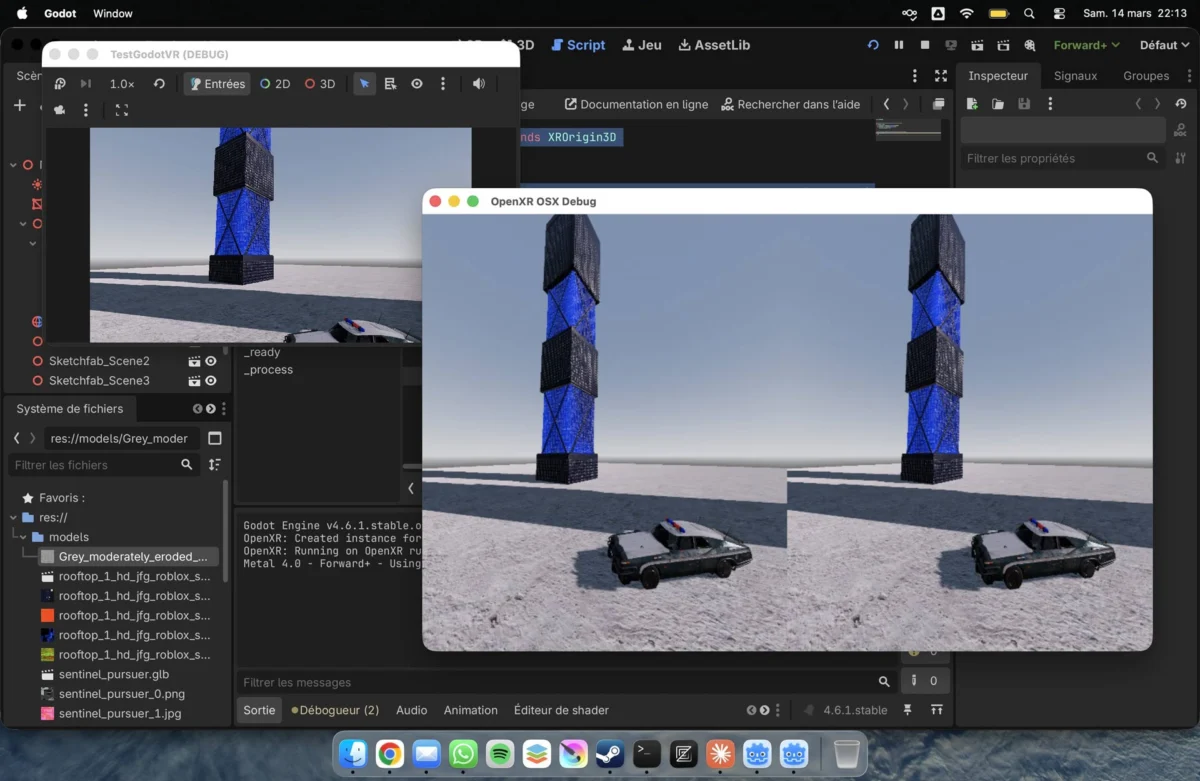
The project currently supports high-fidelity rendering, hand tracking, and controller input. Crucially, it leverages the immense graphical and computational power of Apple’s M-series chips. Initial testing by the developer has demonstrated that the system can handle "heavy" VR scenes with fluid frame rates, suggesting that the hardware limitations of the past are no longer the primary obstacle for Mac VR.
The Open-Source Transition
As of mid-May 2026, the project has transitioned to an open-source model, with its repository hosted on GitHub. This move is intended to invite community contribution, allowing developers worldwide to refine the code, expand device compatibility, and solve existing bugs that a solo developer would struggle to address alone.
Chronology: The Turbulent History of VR on the Mac
To understand the weight of OpenXR OSX, one must examine the "troubled" history of Apple’s relationship with the VR industry.
-
2013–2015: The Early Promise
In the infancy of the modern VR era, Mac compatibility was actually a priority. The early Oculus Rift development kits (DK1 and DK2) featured native macOS support. However, as the consumer version of the Rift approached, Oculus (now Meta) famously dropped Mac support, citing the lack of powerful GPUs in Apple’s lineup at the time. -
2017: The HTC Vive and the External GPU Era
During the WWDC 2017 keynote, Apple made a surprising pivot. They announced a partnership with Valve and HTC to bring SteamVR to macOS. This required the use of "External GPUs" (eGPUs) connected via Thunderbolt 3 to provide the necessary graphical muscle. While it worked, the setup was bulky, expensive, and niche. -
2020–2022: The Silence and the Silicon Shift
As Apple transitioned from Intel processors to their proprietary M-series Silicon, SteamVR support on Mac languished and was eventually deprecated by Valve. During this period, the VR industry shifted toward the OpenXR standard to ensure cross-platform compatibility. While Meta, Valve, and Microsoft joined the OpenXR consortium, Apple notably remained absent, focusing instead on its internal, proprietary frameworks. -
2023–2025: The Vision Pro and the Proprietary Wall
The announcement and release of the Apple Vision Pro signaled Apple’s serious entry into the XR space. However, the Vision Pro utilized "visionOS," a walled garden that did not natively support the thousands of PCVR titles built on OpenXR. This left Mac users with powerful M2, M3, and M4 chips still unable to play standard VR games. -
March–May 2026: The Emergence of OpenXR OSX
Recognizing the untapped potential of Apple Silicon, Yannick Comte began publicizing his work on a native OpenXR runtime for macOS. By May 16, 2026, the project was officially released to the public via GitHub, providing the first viable path for native PCVR on modern Macs.
Supporting Data: Technical Specifications and Performance
The efficacy of OpenXR OSX is rooted in its ability to translate the OpenXR API calls into instructions that macOS and Apple’s Metal graphics API can understand.

Performance Benchmarks
According to data provided by Yannick Comte, the system was rigorously tested using a Mac equipped with an M5-series chipset. The results indicated:
- Frame Consistency: Rendering remained fluid even in complex environments with high polygon counts and advanced lighting.
- Latency: By using a direct thin-client connection, the project minimizes the traditional "streaming lag" associated with third-party solutions.
- Engine Support: The runtime has been confirmed to work with the Godot Engine, which natively supports OpenXR on macOS. While Unity and native C++ applications are theoretically compatible, they require specific recompilation for the Mac architecture.
Current Limitations
Despite its successes, the project remains in an "early-access" or "developer-centric" state. Supporting data highlights three primary hurdles:
- Application Compilation: Currently, Windows-based
.exeVR games cannot be "dragged and dropped" onto the Mac. Developers must compile their OpenXR games specifically for macOS. - SteamVR Dependency: There is currently no direct compatibility with the SteamVR store. Users cannot simply launch their Steam library; they must use apps built specifically for this new runtime.
- Hardware Scope: The initial release is optimized specifically for the Meta Quest 3. While other headsets may eventually be supported, the current focus is on the most popular standalone device on the market.
Official Responses: Voices from the Developer and the Community
The launch of OpenXR OSX has elicited significant interest within the developer community, particularly among those who have long felt abandoned by the lack of official Apple support for industry standards.
Yannick Comte, Lead Developer:
In his official release statement via X (formerly Twitter) and GitHub, Comte emphasized the importance of community: "This is it, native PCVR on MacOS! I implemented a runtime and a streaming app to prove that the Mac is more than capable of high-end VR. By making this open-source, I hope to build a community that can solve the final pieces of the puzzle, such as SteamVR integration and broader controller mapping."
The Khronos Group Context:
While the Khronos Group (the body behind OpenXR) has not issued a formal statement regarding this specific third-party project, their mission has always been "universal compatibility." The existence of OpenXR OSX fulfills the "final vision" of OpenXR—allowing a single application to run across Windows (SteamVR), Linux (Monado), and now macOS.
Industry Analysts:
Tech analysts have noted that Comte’s project puts subtle pressure on Apple. By demonstrating that the M-series chips can handle high-end VR without proprietary visionOS overhead, the project highlights a demand for "open" gaming on Mac that Apple has yet to officially address.
Implications: The Future of Mac Gaming and the XR Industry
The emergence of OpenXR OSX carries profound implications for several sectors of the technology industry.
1. The Democratization of VR Development
For years, VR developers were forced to own a Windows PC to test and build high-end experiences. With this runtime, developers who prefer the macOS environment for coding and creative work can finally stay within their preferred ecosystem to build and test VR applications. This could lead to an influx of creative, Mac-centric software in the VR space.
2. The "Pro" in MacBook Pro
Apple has marketed its M-series chips as "Pro" grade, capable of rivaling high-end desktop GPUs. However, without a gaming ecosystem, this power was often limited to video editing and 3D rendering. OpenXR OSX gives a "reason to exist" for the high-end GPU cores in the M4 and M5 Max/Ultra chips within the gaming world. It transforms the Mac from a workstation into a viable VR gaming rig.
3. Community-Driven Solutions vs. Corporate Silos
This project serves as a case study in the power of open-source development. Where multi-billion dollar corporations like Apple and Meta failed to provide a bridge, a single dedicated developer succeeded. If the community rallies around OpenXR OSX, it could become the "Wine" or "Proton" of the VR world—a essential layer that makes an entire category of software accessible to a previously excluded audience.
4. The Path to SteamVR on Mac
The most significant "Holy Grail" following this release is the potential for a community-driven SteamVR wrapper. If developers can bridge Comte’s runtime with existing translation layers like Game Porting Toolkit (GPTK), the dream of playing a user’s entire SteamVR library on a Mac could move from a "cool project" to a consumer reality.
Conclusion
OpenXR OSX is more than just a technical workaround; it is a statement of intent from the VR community. It asserts that the future of immersive technology should not be dictated by hardware silos or proprietary limitations. While the project is in its infancy and faces significant technical hurdles—most notably the need for native app recompilation—the foundation is now in place. For the first time in nearly a decade, the Mac is back in the PCVR conversation, powered by the ingenuity of the community and the sheer performance of Apple Silicon. As the repository grows and more developers contribute, the "troubled" history of VR on Mac may finally be evolving into a success story.



Leave a Comment