Geekom IT13 Max Review: A Capable Mini-PC Undermined by Last-Gen Components and Limited RAM
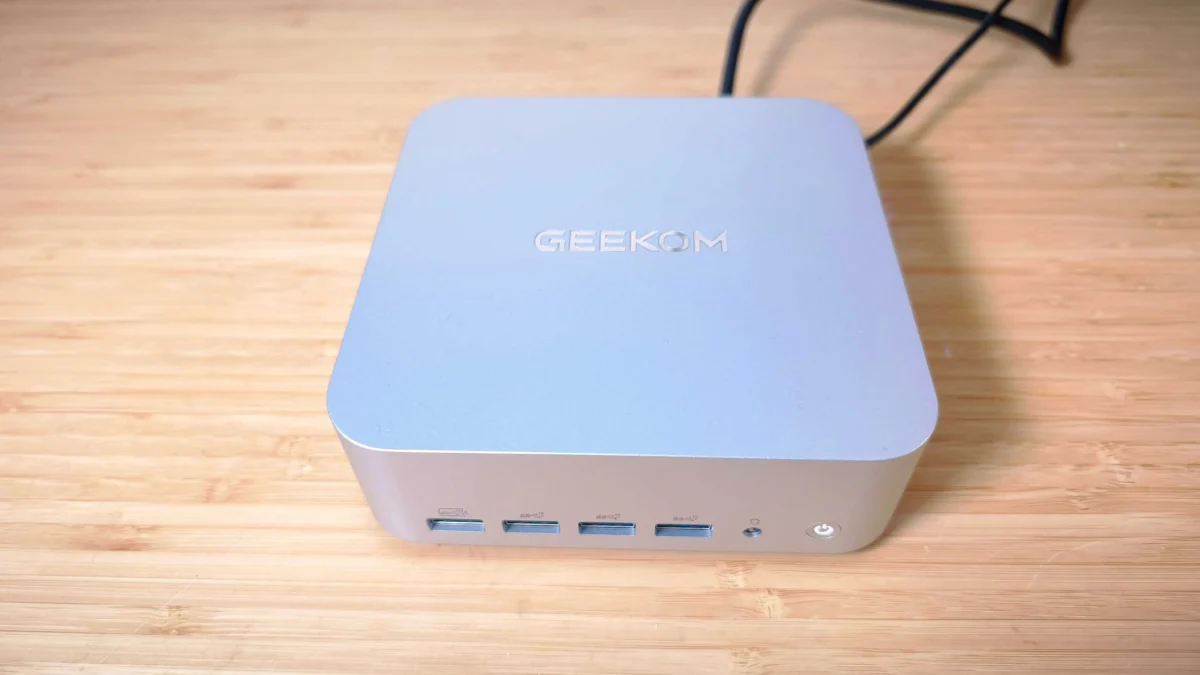
The promise of compact power in the Geekom IT13 Max is largely fulfilled, but its reliance on older technology and a restrictive RAM ceiling prevent it from reaching its full creative potential.
In the ever-evolving landscape of personal computing, mini PCs have carved out a significant niche for themselves, offering a compelling blend of space-saving design, energy efficiency, and surprisingly robust performance. Geekom, a prolific player in this market, continues its push with the IT13 Max, a machine aiming to deliver desktop-grade capabilities in a remarkably small footprint. While the IT13 Max certainly excels in several key areas, particularly its extensive connectivity and thoughtful design, it ultimately falters due to its use of last-generation core technology and a restrictive maximum RAM configuration. This leaves it as a capable option for certain creative workflows, but ill-equipped for the increasingly demanding nature of modern digital artistry.
The Appeal of Mini-PCs in the Creative Studio
The allure of mini PCs in a professional or home studio environment is undeniable. Their diminutive size is a significant advantage, freeing up valuable desk real estate that can be better utilized for larger monitors, expansive graphics tablets, or even 3D printers. Beyond their physical presence, mini PCs are renowned for their energy efficiency, often consuming far less power than traditional desktop towers, which translates to lower operating costs and a more sustainable workflow. Furthermore, their typically reasonable price point allows for the acquisition of multiple units, ideal for outfitting collaborative workspaces or creating dedicated machines for specific tasks.
However, this compact form factor often comes at the cost of raw graphical processing power. Mini PCs predominantly rely on the integrated graphics cores of their CPUs, eschewing the dedicated, high-performance GPUs from manufacturers like Nvidia or AMD that are crucial for intensive visual tasks. This is where the Geekom IT13 Max enters the arena, attempting to strike a balance between the convenience of a mini PC and the power required for creative endeavors.
Geekom’s Continued Presence in the Mini-PC Market
Geekom has established itself as a consistent producer of mini PCs, with its IT series specifically targeting users seeking Intel-powered machines suitable for office work and lighter creative applications. The IT13 Max, while not a radical departure, brings updated components and a refined feature set to the table. The absence of a discrete graphics card and a significantly limited RAM ceiling are the primary constraints that temper its capabilities when dealing with high-resolution video editing or demanding GPU-accelerated effects. Nevertheless, for a machine of its size, it demonstrates a commendable ability to perform, bolstered by an abundance of USB ports that cater to a wide range of peripherals.
Key Specifications: A Closer Look
The Geekom IT13 Max is equipped with the following key specifications:
- CPU: Intel Core Ultra 9 185H
- NPU: Intel AI Boost
- Graphics: Intel Arc (integrated)
- Memory: 24GB LPDDR5
- Storage: 500GB SSD, with an additional M.2 slot for expansion and an SD card reader.
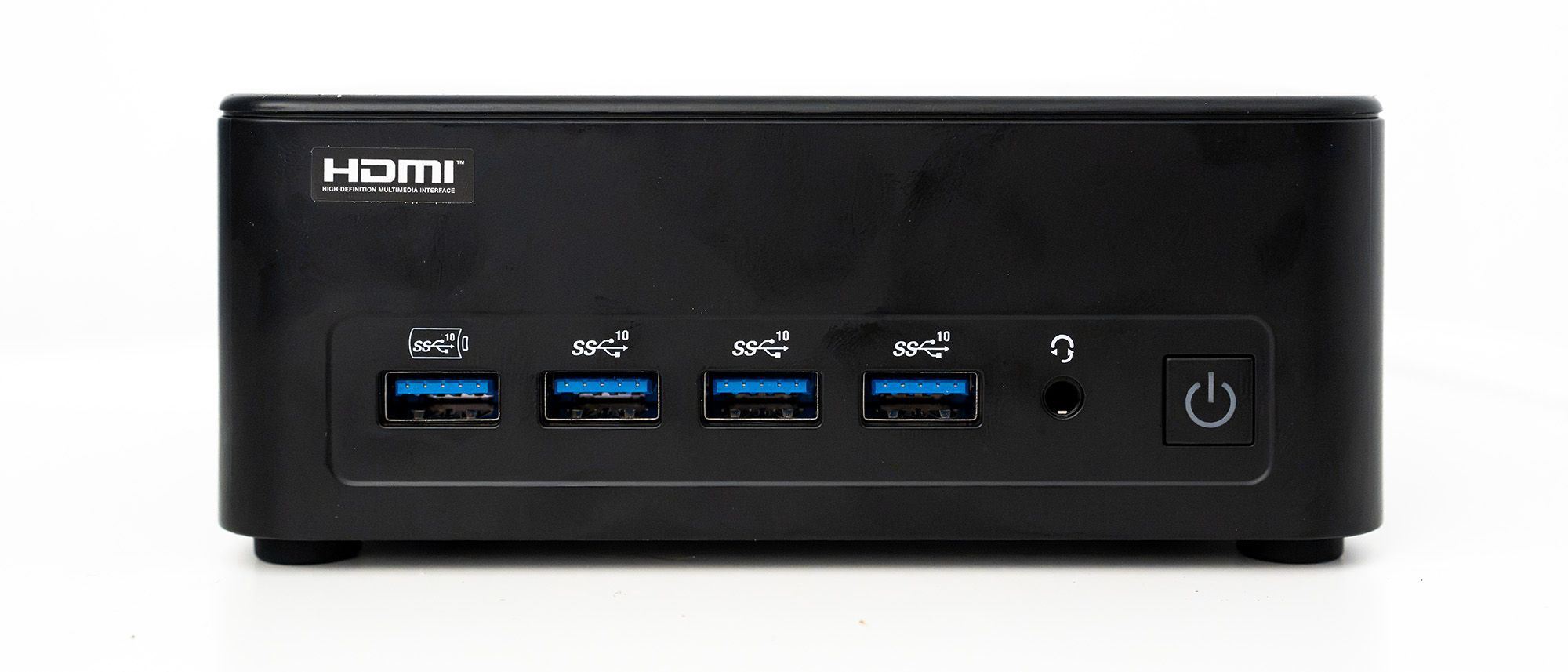
- Ports: A comprehensive array including 2 x USB4, 5 x USB 3.2 Gen 2 Type-A, 1 x USB 2.0, 2 x HDMI 2.0, 2 x 2.5G Ethernet, and a 3.5mm audio jack.
- Wireless Connectivity: Wi-Fi 7 and Bluetooth 5.4.
- Dimensions: 132 x 132 x 50mm
- Weight: 840g
Design, Build, and Display: Functional Elegance
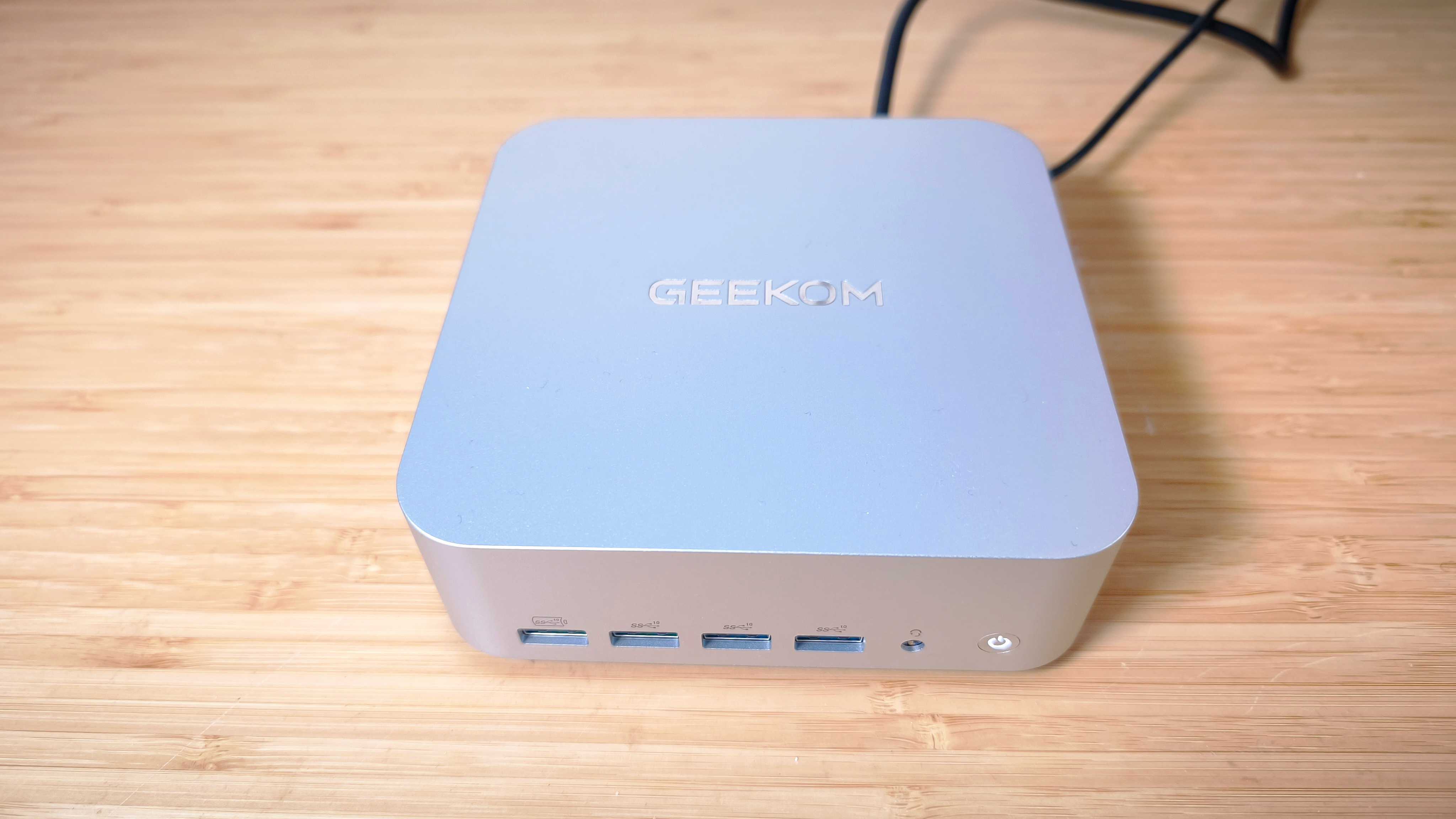
Small and Unobtrusive: The Geekom IT13 Max adheres to the functional design ethos common among mini PCs. Its rectangular chassis, measuring a compact 132 x 132 x 50mm, is a testament to efficient space utilization. While it may not boast the avant-garde aesthetics of some larger workstations, its understated design ensures it will blend seamlessly into any studio environment without demanding undue attention. Compared to some of Geekom’s previous offerings, like the A5 Pro, the IT13 Max is slightly larger, yet it remains considerably more compact than models like the Minisforum MS-01, which is designed to accommodate a discrete graphics card.
Internal Serial Connections: A noteworthy design feature is the inclusion of internal serial connections, specifically RS-485 and RS-232 headers accessible via a removable baseplate. This makes the IT13 Max a potential candidate for industrial control applications, building management systems, or direct integration with CNC machinery that utilizes these legacy communication protocols. This level of specialized connectivity, often overlooked in consumer-grade mini PCs, adds a layer of versatility for specific professional use cases.

VESA Mount Compatibility: For those prioritizing an even more streamlined setup, the IT13 Max comes with a VESA mount adapter. This allows the mini PC to be discreetly attached to the rear of a monitor, effectively creating an all-in-one solution and further reclaiming desk space. This thoughtful inclusion enhances its suitability for minimalist or space-constrained workstations.
Comparison to the Mac Mini: It’s natural to draw comparisons between the IT13 Max and Apple’s iconic Mac Mini. While both offer compact form factors, the IT13 Max presents a slightly different dimensional profile. The M4 Mac Mini, while comparable in price and height, is marginally smaller in width and depth and is lighter. For users where absolute minimal physical footprint is the paramount concern, the Mac Mini might hold a slight edge. However, the IT13 Max compensates with its broader port selection and internal expansion capabilities.
Design Score: 4/5
Features: Connectivity and Expandability at its Core
Abundant USB and Peripheral Ports: The sheer volume of ports on the IT13 Max is immediately impressive. It offers a versatile array for connecting a multitude of devices:

- Dual USB4 Ports: These high-speed ports not only facilitate rapid data transfer but also support external GPU docks, offering a potential upgrade path for graphics-intensive tasks. They can drive up to four 4K displays or a single 8K display, providing ample screen real estate for complex creative projects.
- Five USB 3.2 Gen 2 Type-A Ports: These provide extensive connectivity for peripherals such as external hard drives, drawing tablets, audio interfaces, and keyboards.
- One USB 2.0 Port: While slower, this port is still useful for less demanding peripherals.
- Dual HDMI 2.0 Ports: These allow for straightforward connection to multiple monitors.
- Dual 2.5GbE Ethernet Ports: Offering significantly faster network speeds than standard Gigabit Ethernet, these are invaluable for large file transfers, network-attached storage (NAS) access, and seamless collaboration in networked environments.
- Wi-Fi 7 and Bluetooth 5.4: The inclusion of the latest wireless standards ensures robust and high-speed connectivity for wireless peripherals and network access.
- SD Card Slot: A convenient addition for photographers and videographers looking for quick access to media.
- Always-On Charging Port: One of the USB 3.2 ports is designated as an always-on charging port, allowing devices to be charged even when the PC is powered off, a handy feature for keeping smartphones or other gadgets topped up.
Power Delivery Input: A particularly welcome feature is the USB4 port’s support for Power Delivery (PD) input. This allows the IT13 Max to be powered directly from compatible monitors or docking stations that offer USB-C PD output, eliminating the need for an additional power brick behind the desk. While the included power brick is relatively compact, this functionality significantly contributes to a cleaner and more organized workspace.
Internal Storage Expansion: Accessing the internal components of the IT13 Max is straightforward, involving the removal of the baseplate. This grants users access to a second M.2 slot, providing an avenue for adding an additional SSD for increased storage capacity or a dedicated drive for projects and scratch disk operations. This expandability is a crucial advantage for creative professionals who often deal with large files.
RAM Limitations: The IT13 Max presents a significant drawback in its RAM configuration. The LPDDR5 memory is soldered directly to the motherboard, meaning it cannot be upgraded after purchase. The available configurations are limited to either 1TB SSD with 16GB RAM or the tested unit’s 500GB SSD with 24GB RAM. For intensive creative workloads, particularly those involving large datasets, complex video editing, or substantial multitasking, 24GB of RAM can become a bottleneck. The absence of user-upgradable RAM is a considerable limitation in a device targeting creative users.
Unusual Setup Instructions: An oddity encountered during setup is the presence of stickers advising users not to connect the device to the internet during the initial Windows 11 setup. This prompts the creation of a local account rather than a Microsoft account. While this may appeal to users seeking an air-gapped system for enhanced security or privacy, it results in a barebones Start menu experience that requires immediate installation of essential offline software. This deviates from the standard, more streamlined onboarding process typically found on modern Windows machines.

Feature Score: 4/5
Benchmark Scores: A Tale of Two Technologies
The Geekom IT13 Max is powered by the Intel Core Ultra 9 185H processor, a chip that, while capable, represents the first generation of Intel’s Core Ultra architecture, released in late 2023. This means it has since been superseded by newer generations with improved performance and efficiency. The integrated Intel Arc graphics, while competent for everyday tasks and light graphical work, is also a generation behind the latest offerings.
We employ a standardized suite of benchmarking software to assess the performance of creative hardware:
- Geekbench: This synthetic benchmark tests the CPU’s single-core and multi-core performance, as well as the integrated GPU’s potential for image and video processing. It also includes AI-specific tests to evaluate the system’s capabilities in AI-powered tasks.
- Cinebench: A widely recognized benchmark that measures CPU and GPU rendering capabilities, particularly relevant for 3D modeling and animation work, by simulating Cinema 4D and Redshift rendering tasks.
- UL Procyon: This suite utilizes UL Solutions’ Procyon software to evaluate AI image generation performance (Stable Diffusion), Microsoft Office productivity, and battery life through a looping video test.
- Topaz Video AI: This software is used to test the system’s prowess in upscaling video content and performing slow-motion conversions, demanding significant processing power.
- PugetBench for Creators: This specialized benchmark suite assesses performance in key applications like Adobe Photoshop and Premiere Pro, as well as video encoding and transcoding tasks.
- ON1 Resize AI: This benchmark measures the system’s ability to resize images using AI, specifically by timing the batch processing of five photos to 200% of their original size.
Performance: Strengths and Limitations
Core Technology and Cooling: The Intel Core Ultra 9 185H processor, despite being a first-generation chip, still offers a respectable 16 cores capable of 22 simultaneous threads and a turbo frequency of 5.1GHz. This provides ample power for most office tasks and lighter creative applications. The primary limitation lies in its integrated Intel Arc graphics, which, while capable of running basic graphical applications, are significantly outmatched by dedicated GPUs found in more powerful workstations. The NPU, Intel AI Boost, contributes to AI-accelerated tasks, offering 35 TOPS of performance.

Thermal Management: Interestingly, the IT13 Max demonstrates slightly better performance in benchmarks compared to laptops equipped with the same processor. This is likely attributable to its more substantial chassis and improved cooling. The generous ventilation around the sides, with the SD card slot acting as a small island amidst a sea of grilles, allows for more effective heat dissipation, preventing thermal throttling that can plague thinner mobile devices.
Creative Application Performance:
- Image Editing: In the PugetBench Photoshop benchmark, the IT13 Max performs admirably, slotting in between more expensive machines like the HP Omen Max 16 and the ASUS ProArt P16, both of which feature dedicated GPUs. Its performance even surpasses the ASUS PX13 GoPro Edition in this test, a remarkable feat considering its integrated graphics. This indicates that for 2D design and photo manipulation, the IT13 Max is a competent performer.
- Rendering and Multitasking: The Cinebench 2024 multi-core rendering test shows the IT13 Max outperforming the MacBook Air M5 and the ASUS Zenbook Duo (also equipped with the same CPU). It slightly trails Geekom’s own IT15 mini PC, which features a second-generation Ultra 9 processor, highlighting the generational leap in performance. However, the gap is not as significant as the difference between the IT13 Max and the AMD-powered Geekom A9 Max, which boasts a significantly more powerful Ryzen AI 9 processor and shows a much larger performance advantage in rendering.
- Video Editing and AI Workloads: Where the IT13 Max begins to struggle is in more demanding creative tasks such as video editing and AI-intensive applications. The limited RAM pool of 24GB, combined with the integrated GPU, becomes a significant bottleneck. While the NPU offers AI acceleration, the overall system performance can be sluggish when pushing complex video effects or generative AI tools.
Overall Performance Assessment: The IT13 Max, powered by mature technology, delivers a respectable performance for its class. However, its limitations in RAM and graphics processing power become apparent when tackling the most demanding creative workflows. The integrated GPU and the 24GB RAM ceiling are the primary culprits, making it less ideal for intensive video editing or advanced AI applications compared to systems with dedicated graphics.
Performance Score: 3/5

Price and Value Proposition
Competitive Pricing with Caveats: The Geekom IT13 Max is priced at £999 / $1,399 for both its 16GB RAM/1TB SSD and 24GB RAM/500GB SSD configurations. Given the inability to upgrade RAM, the 24GB version, despite its smaller SSD, might be the more judicious choice for creative users, as the additional storage can be easily addressed with an external drive or the second M.2 slot.
Undercutting the Competition: In terms of value, the IT13 Max presents a more compelling proposition than its direct competitor, the Apple Mac Mini (M4) with 24GB RAM, which typically comes with a smaller 256GB SSD at a similar price point. The IT13 Max offers more storage out of the box and greater internal expandability. However, the question of value becomes more nuanced when considering the overall performance capabilities and the availability of newer, more powerful hardware at comparable price points, especially from other manufacturers or through potential sales.
Value Score: 3/5
Who is the Geekom IT13 Max For?
Office Workers and Students: For individuals whose daily computing needs revolve around standard office applications, web browsing, email, and general productivity tasks, the Geekom IT13 Max is an excellent choice. Its compact size, energy efficiency, and robust port selection make it ideal for a clean and organized workspace.

2D Design and Light Photo Editing: Users engaged in 2D graphic design, layout work (such as InDesign), and moderate photo editing in applications like Photoshop will find the IT13 Max to be more than capable. Its CPU performance and sufficient RAM for these tasks allow for a smooth and efficient workflow.
Don’t Buy It If:
- You’re a Video Editor: Intensive video editing, especially with high-resolution footage, complex timelines, and demanding effects, will push the IT13 Max beyond its capabilities. The lack of a dedicated GPU and the limited RAM will result in significant slowdowns and potential frustration.
- You Rely on GPU-Accelerated AI Tools: While the NPU offers some AI acceleration, the integrated graphics are not sufficient for the most demanding AI-driven creative applications, such as complex 3D rendering, advanced AI art generation, or machine learning tasks that heavily leverage GPU compute.
- You Require Maximum RAM: For users who regularly work with massive datasets, intricate 3D scenes, or run multiple memory-intensive applications simultaneously, the 24GB RAM ceiling will be a significant limitation.
Also Consider
For those seeking alternative solutions in the mini-PC space, several compelling options warrant consideration:
- Geekom A9 Max: This AMD-powered mini-PC offers impressive connectivity with a wealth of ports and strong CPU performance, bolstered by 32GB of RAM. It often represents excellent value, frequently found at a price point below £1000, making it a strong contender for space-limited photo editors and general productivity.
- HP Z2 Mini G1a Workstation: While typically priced higher, the HP Z2 Mini G1a workstation is a powerhouse in a compact form factor. It delivers exceptional performance for demanding creative tasks and is built for professional reliability, justifying its cost through enhanced productivity and stability.
- Apple Mac Mini (M4): The latest iteration of the Mac Mini, particularly with the M4 chip, offers a highly refined user experience and strong performance for general computing and many creative tasks. Its ecosystem integration and polished macOS interface make it a popular choice, though it often comes with a smaller base storage configuration compared to its Windows-based rivals.
Conclusion: A Capable Workhorse with Room for Improvement
The Geekom IT13 Max is a testament to the ongoing advancements in mini-PC technology. It successfully delivers on its promise of a compact, energy-efficient, and highly connected computing solution. Its robust port selection, including dual 2.5GbE Ethernet and USB4, makes it a versatile hub for peripherals and networking. For users focused on office productivity, 2D design, and light photo editing, it offers a satisfying experience and performs admirably, often punching above its weight class in benchmarks.
However, the IT13 Max is ultimately constrained by its reliance on last-generation Intel Core Ultra architecture and, most critically, its non-upgradable 24GB RAM. This limitation significantly hinders its suitability for more demanding creative workloads, such as intensive video editing or advanced AI applications that are becoming increasingly prevalent in creative workflows. While it offers good value against some direct competitors, particularly Apple’s Mac Mini, the performance ceiling is a factor that potential buyers must carefully consider.
For those whose creative needs align with its strengths, the Geekom IT13 Max is a solid choice. But for professionals pushing the boundaries of digital artistry, the allure of more powerful, dedicated graphics and greater RAM capacity will likely lead them to explore other, more robust, workstation solutions. The "Max" in its name feels aspirational rather than definitive, hinting at the potential that could be unlocked with more contemporary core components and greater user-configurable memory.