
Bridging the Gap: KRVR and the Evolution of High-Fidelity PC VR on Apple Vision Pro
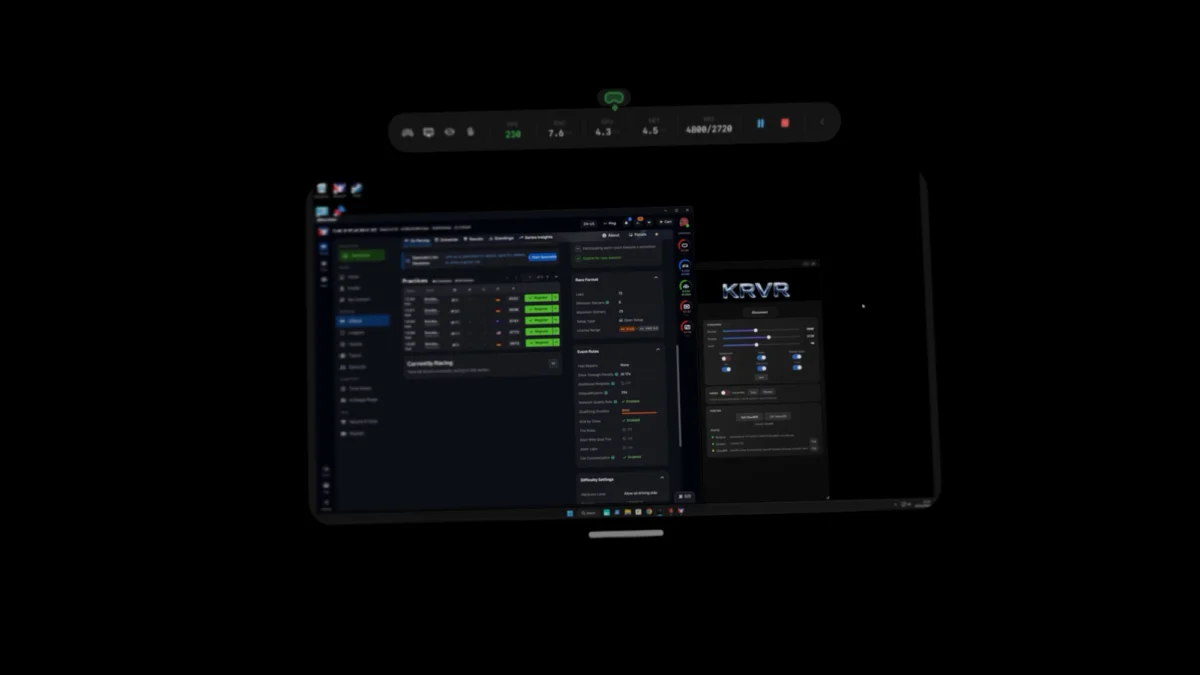
The Apple Vision Pro was famously marketed by Cupertino as a "spatial computer," a device intended for productivity, media consumption, and the next generation of computing interfaces. Gaming, specifically high-end PC VR gaming, was notably absent from the initial marketing blitz. However, the developer community and VR enthusiasts have spent the months following the headset’s launch bridging the gap between Apple’s premium hardware and the massive library of SteamVR content.
The latest entry in this effort is KRVR, a $15 visionOS application that promises to provide the most polished and technologically advanced PC-to-Vision Pro streaming experience to date. By leveraging Nvidia’s CloudXR SDK and Apple’s latest visionOS features, KRVR represents a significant step forward in making the Vision Pro a viable, albeit expensive, alternative to dedicated PC VR headsets.
Main Facts: A Premium Solution for a Premium Headset
KRVR enters a market that was previously dominated by free, open-source tools. Its primary value proposition is the integration of foveated streaming, a technology that uses the Vision Pro’s advanced eye-tracking capabilities to optimize the visual experience.
Key Features of KRVR:
- Price and Availability: The client app is available on the Apple App Store for $15, while the required server-side software is available via GitHub.
- Foveated Streaming Support: Unlike many of its predecessors, KRVR prioritizes bandwidth and resolution based on where the user is looking, significantly reducing the "blur" associated with traditional streaming.
- SteamVR Compatibility: KRVR supports the full SteamVR ecosystem, including titles that do not natively support the OpenXR standard.
- Hardware Requirements: Due to its reliance on the Nvidia CloudXR SDK, the app requires a high-end PC equipped with an Nvidia RTX 40-series (Ada Lovelace) or 50-series (Blackwell) GPU.
- Peripheral Support: The app supports Sony’s PlayStation VR2 Sense controllers, gamepads, and traditional mouse-and-keyboard setups.
While the app is closed-source—a departure from the community-driven ALVR—the developer argues that the $15 price tag covers the cost of a more polished UI and the integration of professional-grade SDKs that provide a more seamless "plug-and-play" experience.
Chronology: The Road to Foveated Streaming on visionOS
The journey to bring PC VR to the Apple Vision Pro has been rapid, driven by three major software milestones and a series of community-led breakthroughs.
1. The Early Days: ALVR and the M2 Launch
Shortly after the Apple Vision Pro launched with the M2 chip, the VR community began porting ALVR (Air Light VR) to visionOS. ALVR is a long-standing open-source project that allows headsets like the Meta Quest to stream SteamVR content. While the initial port proved that the Vision Pro’s micro-OLED displays were spectacular for PC VR, the lack of dedicated controllers and the latency of standard Wi-Fi streaming were significant hurdles.
2. The March Breakthrough: Clear XR
In March, a Canadian software engineer released Clear XR via TestFlight. Clear XR was the first to demonstrate the potential of Nvidia’s CloudXR SDK on the Vision Pro. Crucially, it introduced foveated streaming to the platform, though it was limited to OpenXR titles. While revolutionary, Clear XR has not seen a major update since its initial release, leaving a vacuum for a more maintained, feature-rich alternative.
3. visionOS 2.0 and the Foveated API
The most critical turning point came with Apple’s updates to visionOS (specifically versions leading into and including the 2.0 cycle). Apple introduced a dedicated API for foveated streaming, allowing developers to feed eye-tracking data directly into the video decoder. This allowed for much lower latency and higher perceived resolution.
4. The Arrival of KRVR
KRVR launched as a culmination of these efforts. It took the SteamVR flexibility of ALVR and combined it with the advanced foveated streaming techniques pioneered in Clear XR, packaging them into a paid, supported product that aligns with the premium nature of the Vision Pro hardware.
Supporting Data: Understanding Foveated Streaming vs. Rendering
To understand why KRVR is a significant development, one must distinguish between two often-confused technologies: foveated rendering and foveated streaming.
Foveated Rendering
This occurs on the host device (the PC). The game engine uses eye-tracking data to render only the small area where the user is looking at full resolution. The periphery is rendered at a much lower resolution to save GPU cycles. This is common in high-end headsets like the Varjo XR series or the PSVR 2.
Foveated Streaming
This occurs during the transmission phase. The PC renders the entire frame (or uses foveated rendering to create it), but when it comes time to compress the video to send it over Wi-Fi to the Vision Pro, the "foveated" part kicks in.
- The "Fovea" (Center): The area where your eyes are focused is encoded with a high bitrate and minimal compression artifacts.
- The Periphery: The rest of the image is heavily compressed and sent at a lower bitrate.
Because the Vision Pro has an extremely high pixel density (roughly 3,400 PPI), streaming a full-resolution 4K-per-eye signal over Wi-Fi 6/6E often hits a bandwidth bottleneck, resulting in stutters or compression "mush." Foveated streaming solves this by focusing the available bandwidth exactly where the human eye can actually perceive detail.
Technical Constraint: The "Nvidia Tax"
A crucial data point for potential users is the GPU requirement. KRVR utilizes Nvidia’s CloudXR SDK, which offloads much of the heavy lifting of foveated encoding to the GPU’s hardware encoders. Currently, this specific implementation is optimized for the Ada Lovelace (RTX 40-series) and Blackwell (RTX 50-series) architectures. Users with older cards, such as the popular RTX 3080 or 3090, are currently unable to utilize KRVR, as those chips lack the specific hardware-level support required for this foveated pipeline.
Official Responses and Market Context
While Apple has not officially commented on KRVR or ALVR, the company’s stance on third-party streaming apps has softened. By allowing these apps on the official App Store rather than relegating them to TestFlight, Apple is tacitly acknowledging the demand for high-end VR use cases.
Nvidia, on the other hand, has been proactive. The company’s CloudXR initiative is designed to move VR/AR processing into the cloud or onto powerful local edge servers. The release of CloudXR support for visionOS was a clear signal to developers that Nvidia views the Vision Pro as a top-tier "thin client" for high-end visualization.

The developer of KRVR, known in the community as Kross82, has noted that the project is an ongoing effort to "maximize the visual fidelity of the Vision Pro’s displays." The decision to keep the project closed-source has met with some criticism from the open-source community, but the developer maintains that the revenue from the $15 fee allows for more dedicated support and faster implementation of Nvidia’s evolving SDKs.
Implications: Is the Vision Pro the New PC VR King?
The emergence of KRVR has several long-term implications for the VR industry and Apple’s ecosystem.
1. The High-End Simulation Market
The most immediate beneficiaries of KRVR are simulation enthusiasts. Games like Microsoft Flight Simulator, iRacing, and X-Plane require immense resolution to read cockpit dials and spot distant landmarks. Recently, iRacing and X-Plane launched dedicated visionOS clients using similar CloudXR tech. KRVR provides a bridge for every other simulator on SteamVR, potentially making the Vision Pro the "gold standard" headset for the sim-racing and flight-sim communities, despite its lack of native controllers.
2. The Controller Dilemma
One of the primary hurdles for SteamVR on Vision Pro remains input. While KRVR supports PS VR2 controllers, using them requires a separate setup (often involving Bluetooth dongles or specific SteamVR drivers). The fact that users are willing to pay $15 for an app and navigate complex controller setups suggests a deep hunger for high-end VR that Apple’s "hand-tracking only" philosophy does not satisfy.
3. A Shift in GPU Demand
KRVR’s strict requirement for RTX 40 and 50-series cards highlights a growing trend: the hardware encoding capabilities of a GPU are becoming as important as its raw rendering power. For the first time, users might upgrade their GPUs not just for more frames, but for the ability to stream those frames more efficiently to a mobile headset.
4. Pressure on Valve and Meta
If third-party developers can create a high-fidelity SteamVR experience on Apple’s hardware, it puts pressure on Valve to eventually release its own "Steam Link" app for visionOS. It also challenges Meta’s Quest Pro and upcoming high-end headsets; if the Vision Pro can act as a superior PC VR display through apps like KRVR, Meta must rely on its lower price point and native ecosystem to maintain its lead.
Conclusion
KRVR is more than just a $15 utility; it is a proof of concept for the future of "spatial computing" as a high-end gaming tier. By successfully implementing foveated streaming via Nvidia CloudXR, it unlocks the true potential of Apple’s micro-OLED displays—potential that Apple itself has been hesitant to market. For those with a cutting-edge Nvidia GPU and an Apple Vision Pro, the barrier between the world’s most advanced mobile hardware and the world’s most expansive VR library has finally been thinned.



Leave a Comment