The Evolution of Meta Virtual Display: Achieving Platform Parity and Spatial Productivity

In the rapidly shifting landscape of spatial computing, the boundary between traditional 2D monitors and immersive 3D environments is becoming increasingly porous. Meta, the leader in the consumer VR space, has spent the last year aggressively repositioning its Quest ecosystem from a gaming-first platform to a versatile "spatial computer" capable of replacing a physical office. The most recent and significant milestone in this journey is the overhaul of the Meta Virtual Display feature.
With the release of Horizon OS 2.7 and the subsequent updates to the desktop clients, Meta has finally brought the Mac version of its remote desktop software to functional parity with its Windows counterpart. This transition marks a critical moment for professionals who rely on macOS, as it introduces seamless connection methods, expanded display formats, and long-awaited input forwarding.
Main Facts: A Unified Vision for Quest Productivity
The core of the recent update lies in the rebranding and consolidation of Meta’s productivity tools. What was once known as "Remote Desktop" has been officially renamed Virtual Display. This change is not merely cosmetic; it represents a unified approach to how the Quest headset interacts with external hardware.
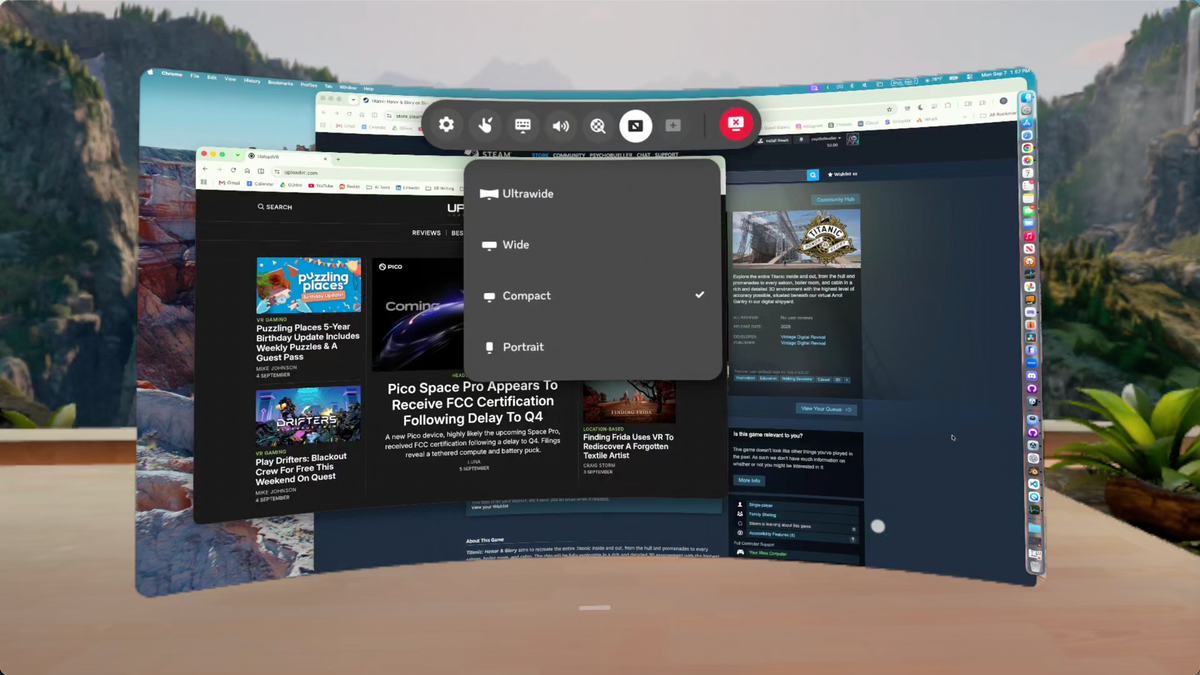
Key features now available on both Windows and Mac include:
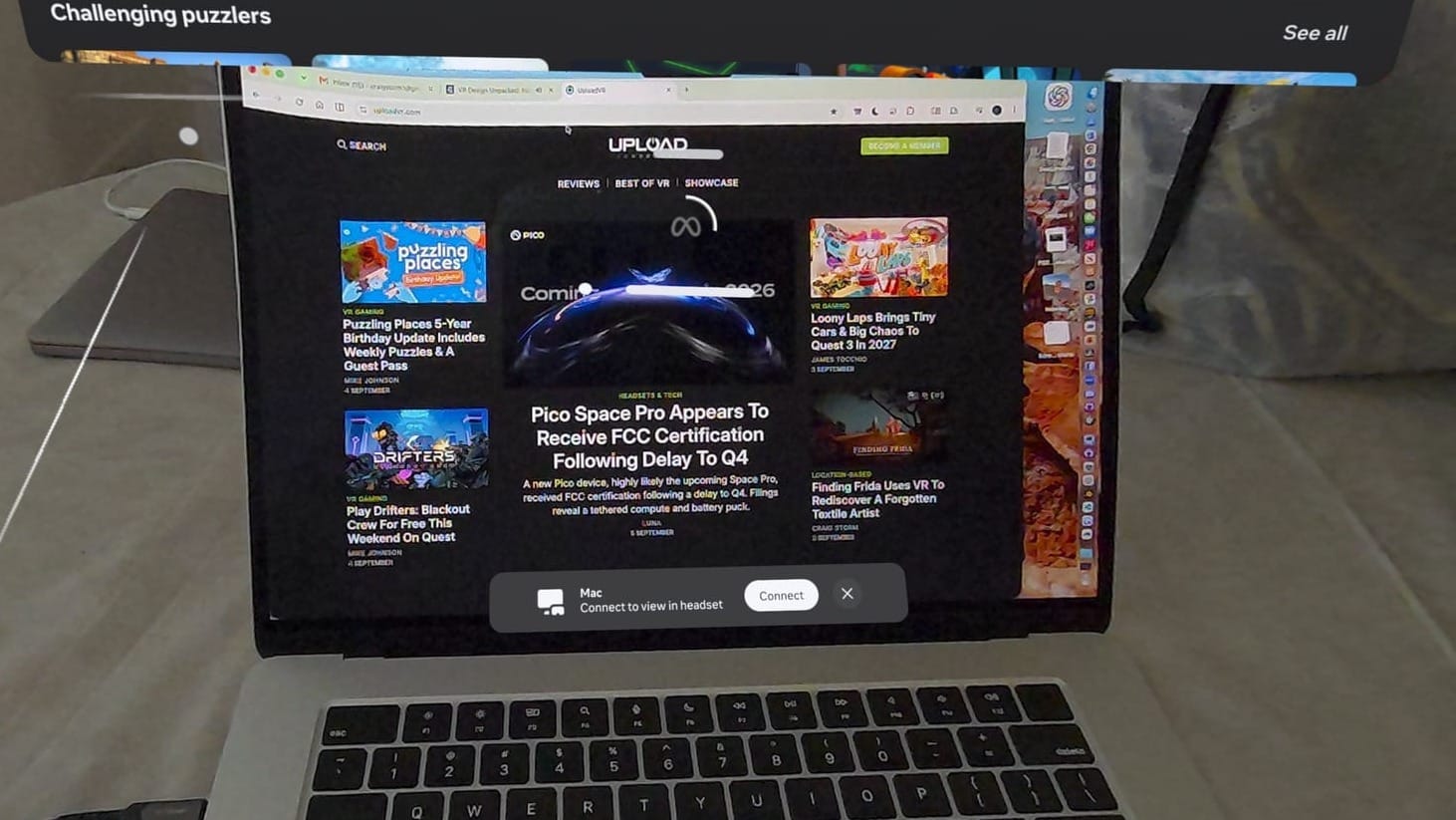
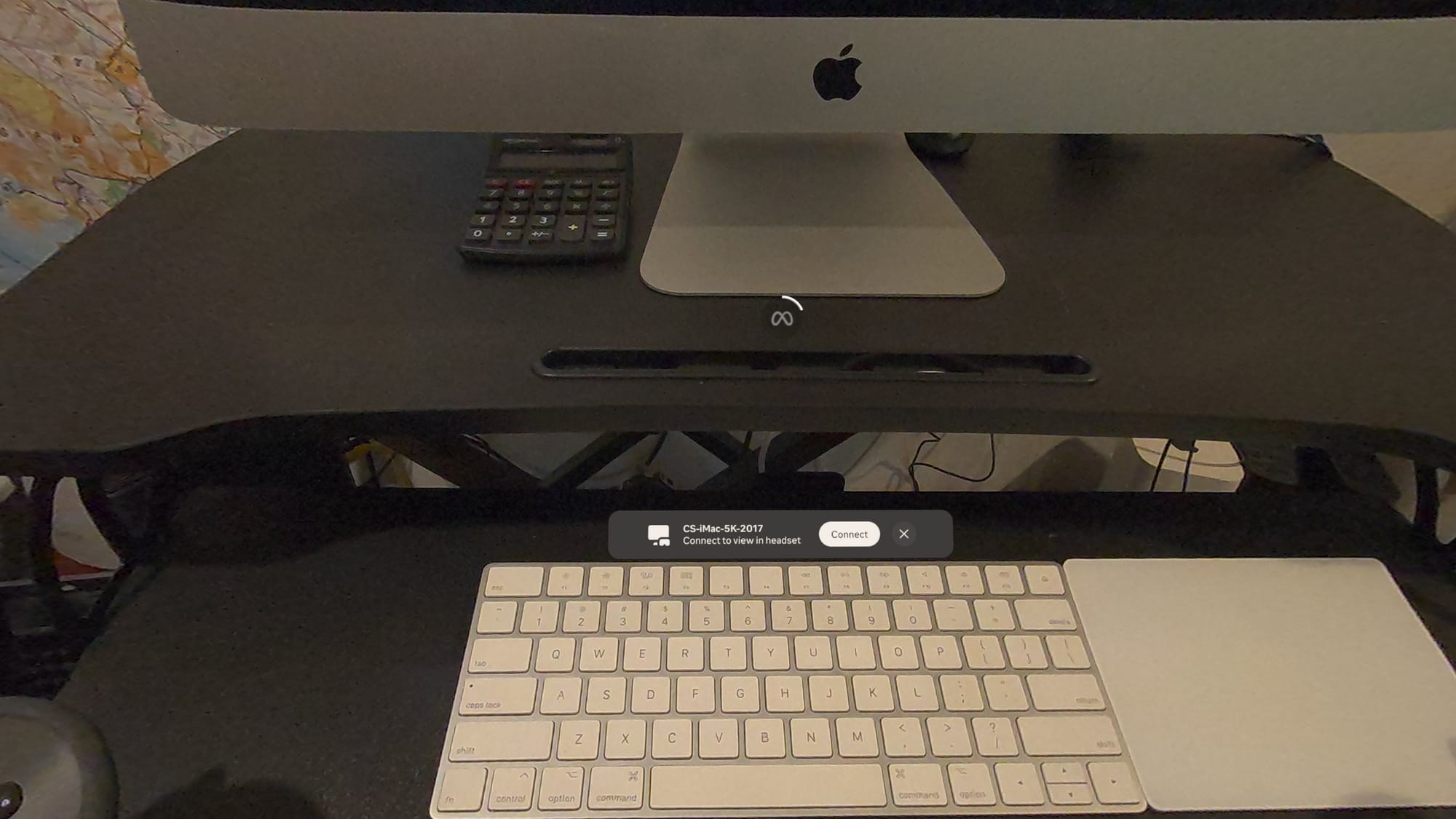
- Seamless "Look-to-Connect" Interface: Leveraging the Quest’s passthrough capabilities, users no longer need to navigate deep into menus to start a session. By simply looking at a physical computer while wearing the headset, a floating “Connect to view in headset” button appears in the AR space, allowing for an instantaneous transition to a virtual workspace.
- Input Forwarding: Historically, Meta’s remote solution was a one-way street—a way to view the computer, but not interact with it via VR hardware. The latest update enables "Input Forwarding," allowing Quest Touch controllers to act as a mouse and interaction tool within the macOS or Windows environment.
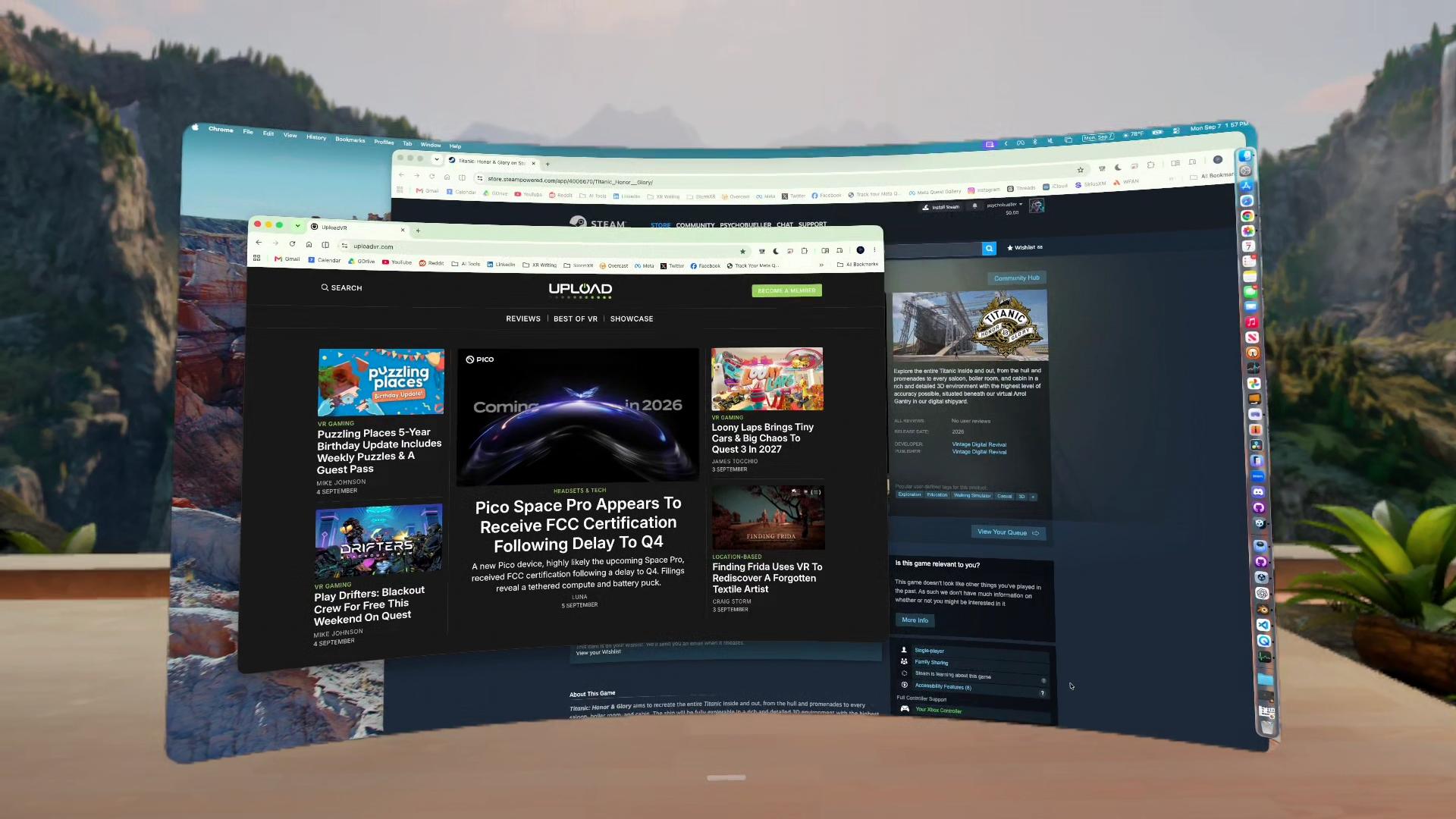
- Expanded Display Formats: Users are no longer limited to a single 16:9 mirror. The software now supports Portrait, Compact, Wide, and Ultrawide (curved) formats, with the ability to manage up to three large virtual screens simultaneously.
- HDMI Link Integration: In a move toward consolidation, Meta has folded the functionality of the "Meta Quest HDMI Link" app into the Virtual Display app. This allows the Quest to act as a monitor for any device with an HDMI output—including gaming consoles, handhelds (like the Steam Deck), and smartphones—provided a compatible UVC capture card is used.
Chronology: From Experimental Tool to Core Feature
The road to the current iteration of Virtual Display has been one of incremental, often unannounced, improvements.
- Late 2023 – Early 2024: Meta’s "Remote Desktop" app was largely seen as a secondary tool compared to third-party solutions like Immersed or Virtual Desktop. It suffered from latency issues and a lack of interactive features, particularly on macOS.
- Late 2024: Meta introduced the "Seamless Remote Desktop" experimental feature for Windows 11. This introduced the concept of the headset recognizing the physical PC in the room and offering a quick-connect prompt. During this period, Windows users also received the first taste of "Ultrawide" and "Wide" display formats.
- August 2024: With the rollout of Horizon OS 2.7, Meta officially retired the "Remote Desktop" name in favor of "Virtual Display." This update also signaled the beginning of the end for the standalone HDMI Link app, integrating those drivers into the main OS architecture.
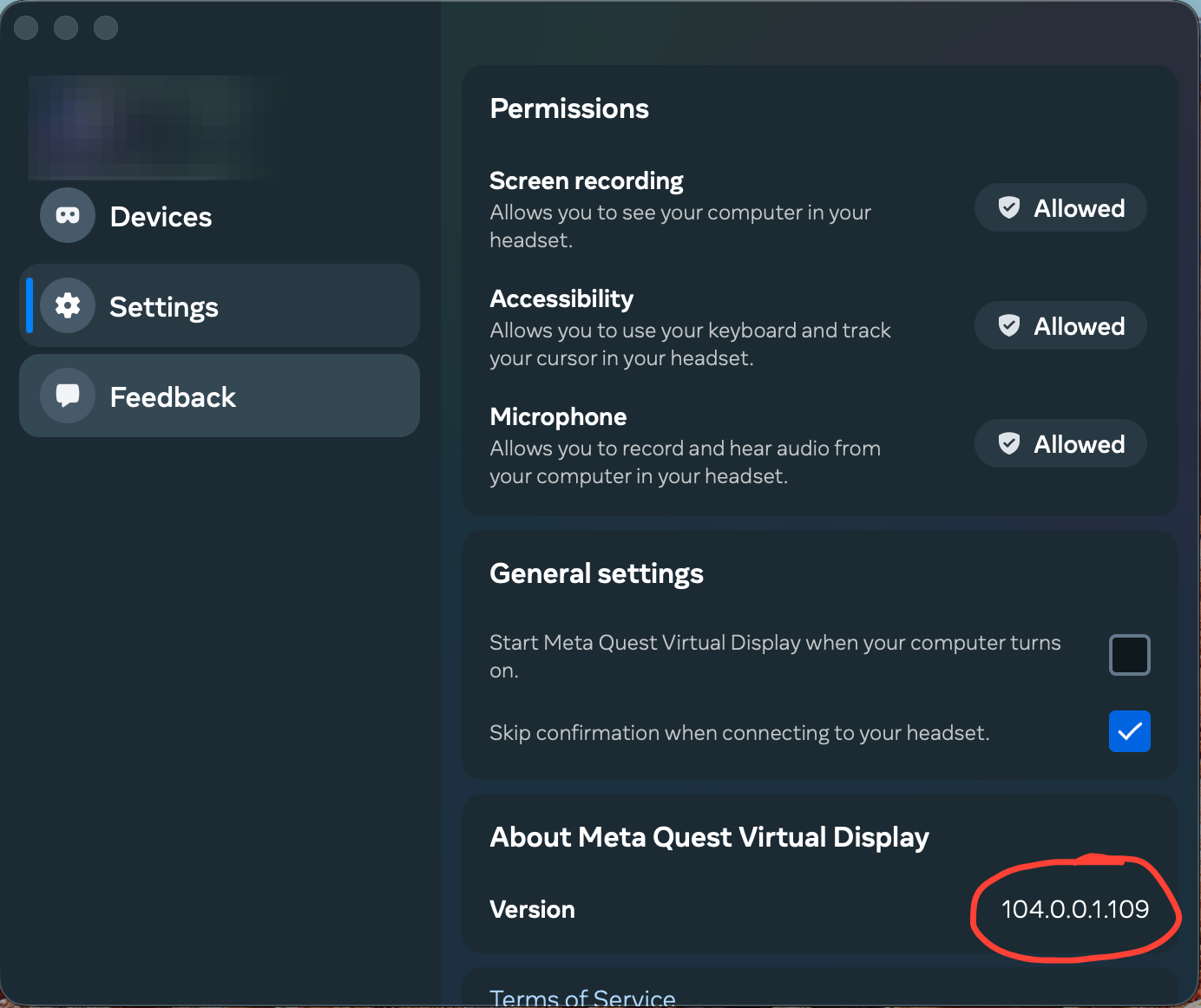
- September 2024: The macOS client (version 104.0.0.1.109) was updated to include the "Look-to-Connect" prompt and full input forwarding, finally closing the feature gap between the two major operating systems.
Supporting Data: Performance and Compatibility Across Hardware
Testing the new Virtual Display features across various hardware configurations reveals a high level of optimization, though some discrepancies remain between Apple Silicon and legacy Intel-based Macs.
Performance on Apple Silicon (M2 MacBook Air)
On modern ARM-based Macs, the Virtual Display experience is remarkably stable. The "Look-to-Connect" prompt appears almost instantly upon the headset’s cameras identifying the laptop lid. The input forwarding of the Touch controllers exhibits negligible latency, making it feasible to perform basic navigation and window management without reaching for a physical mouse.
Performance on Legacy Intel Macs
A significant finding in recent testing is Meta’s continued, albeit selective, support for Intel-based Macs.
- 2017 27-inch 5K iMac (Intel Core i7): Despite the previous Remote Desktop app failing to connect for over a year, the new Virtual Display app (running on macOS Ventura) connects successfully. More importantly, it supports the quick-connect prompt, effectively breathing new life into older hardware as a workstation hub.
- 2017 MacBook Pro (Intel Core i5): While the Virtual Display itself functioned, the "Look-to-Connect" prompt failed to trigger. This suggests that the computer vision required for the seamless connection may rely on specific hardware profiles or webcam/sensor configurations that vary by model.
Display Customization
The update provides granular control over the virtual environment. Users can toggle between:
- Larger Text: Optimizes for readability, essential for coding or long-form writing.
- Default: A balanced 1440p-equivalent workspace.
- More Space: Increases virtual resolution to allow for more windows, though it requires higher visual acuity from the user.
Official Responses and Strategic Context
While Meta has not released a singular "feature deep-dive" for the Mac update, their documentation for Horizon OS 2.7 and the updated Meta Quest Help Center pages emphasize a "frictionless" productivity experience.
In a statement regarding the rebranding, Meta noted that Virtual Display is designed to be "automatically installed and ready to go," reflecting a shift away from the "app-store" model for core features and toward a more integrated OS experience. This mirrors Apple’s approach with the Vision Pro’s "Mac Virtual Display," where the headset and the computer recognize each other via proximity and iCloud identity.
Industry analysts suggest that Meta’s rush to bring Mac parity is a direct response to the Apple Vision Pro. While Apple’s solution is currently limited to Mac and offers only one virtual screen (with a second recently added in beta), Meta is positioning the Quest as the "open" alternative that supports Windows, Mac, and any HDMI device, often with more simultaneous screens than Apple currently allows.
Implications: The Future of the "Headset as a Monitor"
The enrichment of Meta Virtual Display has profound implications for the future of work and the viability of VR as a daily-driver tool.
1. The Death of the Physical Multi-Monitor Setup
For digital nomads and remote workers, the ability to carry three ultrawide, high-resolution monitors in a backpack is no longer a "coming soon" promise. The stability of the Mac client means that creative professionals—who historically favor Apple hardware—can now utilize the Quest 3 or Quest Pro for video editing, design, and complex workflows that require massive screen real estate.
2. The Input Friction Problem
Despite the progress, a significant hurdle remains: the "Input Silo." Currently, while the Quest controllers can control the Mac, the Mac’s own trackpad and keyboard cannot "break out" of the virtual screen to control the Quest’s native menus or other Horizon OS panels. This creates a disjointed experience where the user must switch between controller-tracking and hand-tracking depending on whether they are interacting with the computer or the headset’s settings.
Third-party apps like Fluid have already solved this by allowing Bluetooth mice to control both the virtual windows and the OS menus. Meta’s failure to implement this suggests a lingering architectural divide within Horizon OS that needs to be bridged to achieve true "spatial" fluidity.
3. Consolidation and Ecosystem Lock-in
By folding HDMI Link and Remote Desktop into a single "Virtual Display" umbrella, Meta is simplifying the user journey. However, it also signals an intent to dominate the "utility" layer of the headset. As these first-party tools become more robust, third-party developers who built the foundations of VR productivity may find themselves squeezed out, unless they can offer features (like shared spaces or advanced custom environments) that Meta’s streamlined tool lacks.
4. Accessibility and Legacy Support
The fact that a 2017 iMac can still function as a high-end virtual workstation via the Quest is a win for sustainability and accessibility. It lowers the barrier to entry for spatial computing, allowing users with older hardware to benefit from the ergonomics of a virtual office without needing to upgrade their primary PC or Mac immediately.
In conclusion, the update to Meta Virtual Display is a quiet but powerful statement of intent. By achieving Mac parity and integrating HDMI support, Meta has turned the Quest from a standalone console into a universal display hub. As the software continues to mature, the "Virtual Display" may soon become the most used app on the platform, finally fulfilling the promise of the headset as a true companion to the personal computer.